What Is an Orthomosaic? A Practical Guide for Construction and Land Projects
By Kush Agarwal, President and CEO, YelloSKYE. Published .
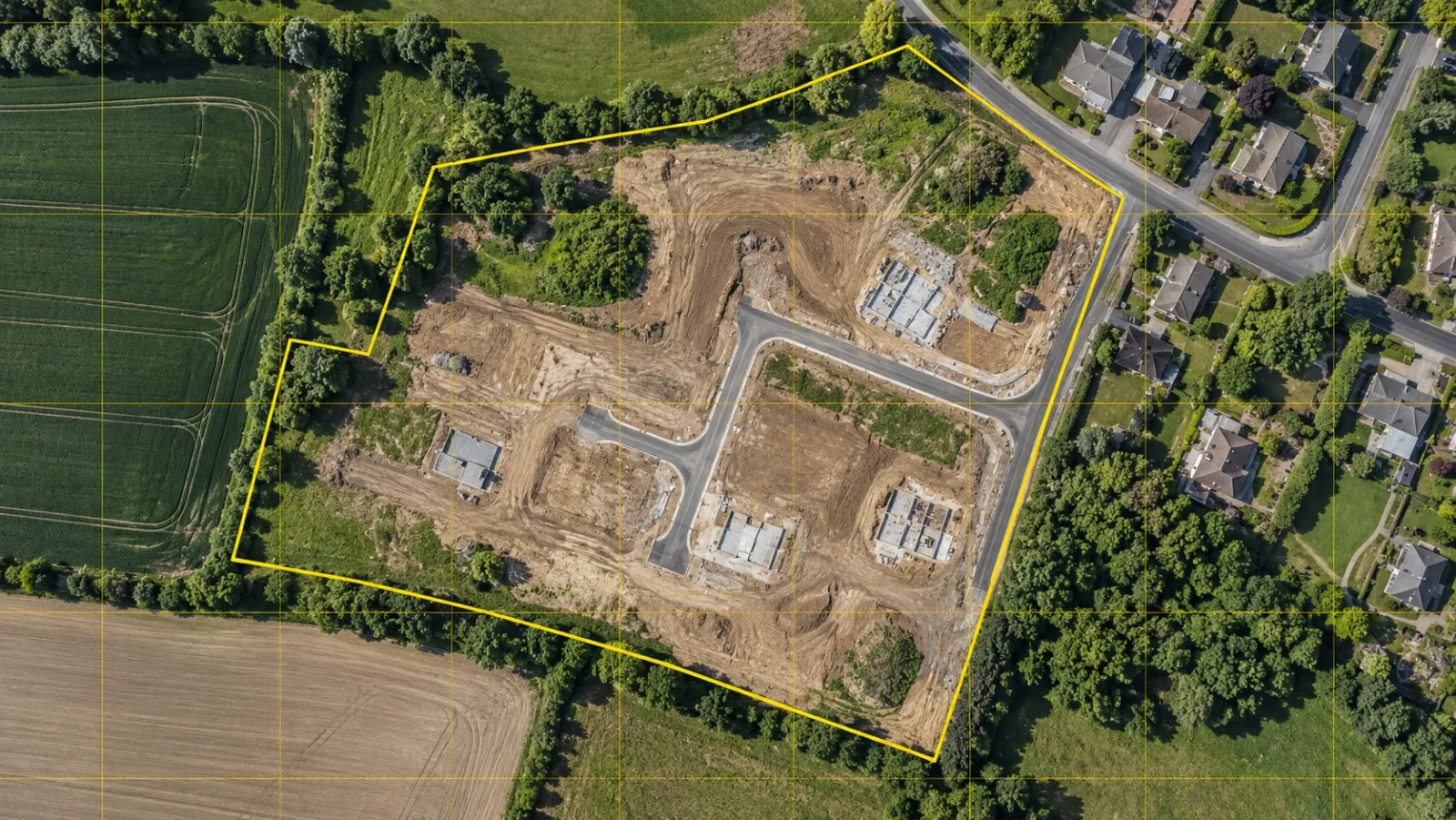
Executive Summary
- The Question: What is an orthomosaic, and why do construction and land teams rely on it?
- The Answer: An orthomosaic is a single, true-to-scale aerial map built from hundreds of overlapping drone photos that have been corrected for tilt, lens distortion and terrain, then tied to real-world coordinates. Unlike an ordinary aerial photo, you can measure on it.
- The YelloSKYE Angle: An orthomosaic is most useful when it is the base layer for terrain models, volumes, design overlays and a dated site record. That is how Survey IQ delivers it, inside the DEX platform.
An orthomosaic is a geometrically corrected aerial image of a site, stitched together from many overlapping drone photographs so that every part of the image shares the same scale. Because it is also georeferenced, you can measure lengths, areas and positions on it with survey-level confidence, which an ordinary aerial photo does not allow.
For developers, EPC contractors and project management teams, the orthomosaic is usually the first deliverable from a drone survey and the one most people look at. It is the base layer that YelloSKYE's Survey IQ builds everything else on: contours, terrain models, cut-and-fill volumes and design overlays. This guide explains what an orthomosaic is, how it is made, what controls its accuracy and how it is used from land acquisition through to handover.
What is an orthomosaic?
The word combines two ideas. "Ortho" refers to orthorectification: correcting an image so that each point appears as if seen from directly overhead. "Mosaic" refers to joining many images into one.
A single drone photo is a perspective view. Objects near the edge of the frame lean outwards, higher ground appears closer to the camera than lower ground, and any tilt in the camera shifts features away from their true position. You can recognise a site in such a photo, but you cannot reliably measure it.
An orthomosaic removes those distortions. Processing software calculates where each photo was taken from and how the ground undulates beneath it, then reprojects every pixel onto a flat map plane. The result has a uniform scale from corner to corner: a pixel at the edge of the site covers the same ground distance as a pixel at the centre. Add coordinates, and the image becomes a map.
Ground sampling distance (GSD)
The resolution of an orthomosaic is expressed as ground sampling distance, the real-world distance covered by one pixel. A GSD of 2 cm means each pixel represents a 2 cm by 2 cm patch of ground. Lower flights give a finer GSD and more detail; higher flights cover more area per battery but show less. Choosing the GSD is the first decision in any orthomosaic project, because it sets what you will be able to see and measure later.
Orthomosaic vs aerial photo vs satellite image
People often treat these three as interchangeable. For engineering use they are not.
| Attribute | Single aerial photo | Satellite image | Drone orthomosaic |
|---|---|---|---|
| Scale | Varies across the frame | Uniform, but coarse | Uniform across the whole site |
| Typical resolution | High, but distorted | Tens of centimetres or more | A few centimetres per pixel |
| Georeferencing | None or approximate | Approximate | Controlled to project coordinates |
| Currency | Whenever taken | On the provider's schedule | Flown when the project needs it |
| Can you measure on it? | Not reliably | Only roughly | Yes: distance, area, and volume with elevation data |
| Repeatable for comparison | Hard to align | Limited | Each flight aligns to the same coordinate system |
The practical difference is trust. A site manager can look at an aerial photo and form an impression. An engineer can take a dimension off an orthomosaic and use it in a calculation.
How a drone orthomosaic is made
Producing a usable orthomosaic is a sequence of decisions, and an error at any step carries through to the final map.
1. Flight planning
The survey team defines the site boundary, target GSD and flight height, then plans an automated grid. Photos must overlap heavily, both along each flight line and between adjacent lines, so that the software sees every point on the ground from several angles. Sites with tall structures, steep cuts or dense tree cover need more overlap and sometimes additional oblique passes.
2. Ground control
Accuracy is set on the ground, not in the air. Ground control points (GCPs) are marked targets whose coordinates are measured precisely with survey equipment. Drones carrying RTK-GNSS record a corrected position for each photo. Survey IQ uses both together, which is how YelloSKYE reaches sub-5 cm horizontal and vertical accuracy on its drone topographic surveys.
3. Image capture
The drone flies the planned grid and captures geotagged images, often several hundred to a few thousand on a large parcel. Consistent light matters: harsh midday shadows and changing cloud cover both make stitching harder and the final map less even.
4. Photogrammetric processing
Photogrammetry software finds matching features across overlapping photos, solves for each camera position and builds a dense 3D reconstruction of the ground. From that reconstruction it generates a surface model, then uses the surface model to orthorectify every photo and blend them into one seamless mosaic.
5. Quality checks and delivery
Check points, which are surveyed targets not used in processing, are compared against the finished map to confirm the stated accuracy. The orthomosaic is then published for the project team. With Survey IQ it lands in the DEX platform, where stakeholders can view and measure it in a browser instead of passing large files around.
What the same flight produces
The orthomosaic is rarely delivered alone. One set of drone images supports a full survey data package, which is why it pays to plan the flight around everything the project will need.
| Output | What it contains | Typical format | Used for |
|---|---|---|---|
| Orthomosaic | True-to-scale, georeferenced top-down image | GeoTIFF | Site plans, boundary checks, design overlays, progress records |
| Digital Surface Model (DSM) | Elevation of the top surface, including structures and vegetation | GeoTIFF | Stockpiles, structure heights, line-of-sight checks |
| Digital Terrain Model (DTM) | Bare-earth elevation with objects removed | GeoTIFF, DXF | Grading design, drainage, cut-and-fill |
| Contour map | Elevation lines at a chosen interval | DWG / DXF | Feasibility, planning submissions, civil design |
| Point cloud | Millions of 3D points with colour | LAS, LAZ, RCP | Engineering analysis, BIM and CAD workflows |
| 3D mesh | Textured surface model of the site | OBJ, FBX | Visualisation and stakeholder review |
| Volumetric report | Cut, fill and stockpile quantities | Earthwork billing and material reconciliation |
Survey IQ deliverables include georeferenced orthomosaic maps, contour maps, DTM and DSM surfaces, volumetric reports, point clouds and CAD- and GIS-ready exports, in formats engineers and architects already use.
How orthomosaics are used across a project
Land acquisition and feasibility
Before a parcel is bought, an orthomosaic with the cadastral boundary overlaid shows the true perimeter, the usable acreage and any encroachment. Paired with a terrain model, it lets the acquisition team see slope, drainage and likely earthwork before the sale agreement is signed. With YelloSKYE's pre-acquisition drone land survey, this due diligence is finished 5× sooner than it would be with a traditional ground survey.
Design validation
Planning teams align the CAD layout to the orthomosaic and terrain model so road alignments, building footprints and setbacks sit on real ground coordinates. Level mismatches and alignment errors show up at the drawing stage, when changing them costs little. In YelloSKYE's terrain-based design validation work, this gives 100% terrain verification before construction begins.
Earthwork and stockpiles
When each orthomosaic comes with an elevation model, comparing two flights gives the volume of material cut, filled or stockpiled between them. The image in this guide shows exactly that: a polygon drawn on the orthomosaic in DEX, with cut and fill volumes calculated against a reference plane. On one highway project, YelloSKYE's automated earthwork volumetrics took survey turnaround from two weeks down to a few hours and removed billing disputes over cubic metres moved.
Progress and change detection
Flown weekly, monthly or on demand, a series of orthomosaics becomes a dated, aligned record of the site. Laying two dates side by side shows what changed and when: new foundations, haul road diversions, material arriving or leaving. In DEX, the same view carries CAD and BIM overlays, so planned and actual can be compared on one screen.
Records for claims and handover
Because each orthomosaic is dated and georeferenced, it is useful evidence. When a contractor's claim, a variation or an insurance question comes up months later, the team can open the map from the relevant week and measure what was on the ground. At practical completion, a final orthomosaic gives the owner an as-built site record that can be shared and queried long after the project team has moved on.
Linear infrastructure, mining and utilities
The same method scales to roads, pipelines, transmission corridors, mines and solar parks. For long assets, orthomosaics support right-of-way mapping and alignment checks; for mines and quarries, they underpin periodic volume surveys and lease boundary compliance.
What determines orthomosaic accuracy
Two maps can look equally sharp and still differ widely in accuracy. The factors that matter most:
- Ground control. Without GCPs or RTK/PPK positioning, an orthomosaic can look internally consistent but sit metres away from its true position. Control is what ties it to the project's coordinate system.
- Overlap. Too little overlap leaves gaps and stitching errors, particularly over uniform surfaces such as water, fresh concrete or bare soil.
- GSD. You cannot measure features smaller than a few pixels. Pick the GSD for the smallest thing you need to see.
- Terrain and vegetation. Dense canopy hides the ground. The orthomosaic shows the treetops, and the terrain model under them is interpolated, not observed.
- Repeatability. For change detection, each flight must be controlled to the same coordinate system, or apparent changes may only be misalignment.
It also helps to separate relative accuracy (how well distances within the map match reality) from absolute accuracy (how well the map sits on true ground coordinates). Area measurements need good relative accuracy. Overlaying a design or a legal boundary needs good absolute accuracy as well.
How often should you fly?
There is no single right interval. Match the capture cadence to how fast the ground is changing and to the reporting or billing cycle it supports.
| Project stage | What is changing | Suggested cadence |
|---|---|---|
| Acquisition and feasibility | Nothing yet; one baseline needed | One survey, plus one before mobilisation |
| Site preparation and earthwork | Levels and volumes change daily | Aligned to the earthwork measurement and billing cycle |
| Foundations and structure | Footprints and site logistics | Fortnightly or monthly |
| Finishing and external works | Roads, landscaping, services | Monthly, plus a final as-built flight |
| Operations and portfolio | Slow change, compliance checks | Quarterly or on demand |
What an orthomosaic cannot show
An orthomosaic is a top-down view, so it has limits worth stating plainly:
- It does not show vertical faces well. Facades, retaining walls and structural members need oblique imagery, 360° capture or laser scanning.
- It cannot see inside buildings or beneath canopy. Interior progress needs ground-level capture, which is where Construct IQ and BIM IQ come in.
- It is not a legal boundary survey. A drone survey is excellent for checking boundaries and acreage, but formal demarcation still needs a licensed surveyor in most regions.
Knowing these limits is what lets a team choose the right sensor for each question rather than expecting one dataset to answer all of them.
Why the orthomosaic belongs in a shared platform
A precise orthomosaic saved in a folder is a good picture of one day. It becomes an operational tool only when it sits alongside the drawings, the earlier flights and the people who need to act on it.
That is the reasoning behind delivering Survey IQ outputs through DEX. Each orthomosaic is aligned with previous flights on one timeline, CAD and BIM can be overlaid on it, and stakeholders can measure distance, area and volume from their desks. Drone data also sits beside 360° captures, fixed-camera feeds and laser scans from the same site, so a question raised in a review meeting can be answered from the record rather than from another site visit.
For developers, EPCs and PMOs running several sites at once, that shared record matters as much as the accuracy of any single map. The orthomosaic is where the site record starts.
Frequently asked questions
What is an orthomosaic in simple terms?
An orthomosaic is a single map-like image made by stitching many overlapping drone photos together and correcting them so the whole image has one consistent scale. Because it is also tied to real-world coordinates, you can measure distances and areas on it directly, much as you would on a survey drawing.
What is the difference between an orthomosaic and photogrammetry?
Photogrammetry is the method; the orthomosaic is one of its products. Photogrammetry software works out camera positions and ground geometry from overlapping photos, and from that it produces an orthomosaic, a surface model, a point cloud and a 3D mesh. All of them come from the same set of images.
How accurate is a drone orthomosaic?
Accuracy depends on flight height, image overlap, camera quality and, above all, ground control. YelloSKYE flies RTK-GNSS-equipped drones with ground control points and achieves sub-5 cm horizontal and vertical accuracy, which suits feasibility studies, cut-and-fill analysis and design work. Legal boundary demarcation still needs a licensed surveyor in most regions.
What is the difference between an orthomosaic and a satellite image?
A satellite image is captured on the satellite operator's schedule, usually at lower resolution, and is rarely current enough for an active site. A drone orthomosaic is flown when the project needs it, at a resolution of a few centimetres per pixel, and is controlled to project coordinates so it can be overlaid on drawings and compared flight to flight.
What file format is an orthomosaic delivered in?
Orthomosaics are normally delivered as GeoTIFF files, which carry the image and its coordinate information together so GIS and CAD tools can place them correctly. The elevation models, point clouds and meshes from the same flight are delivered in formats such as LAS, DXF and OBJ.