Drone Topographic Survey: How It Works, What You Get and How to Scope One
By Kush Agarwal, President and CEO, YelloSKYE. Published .
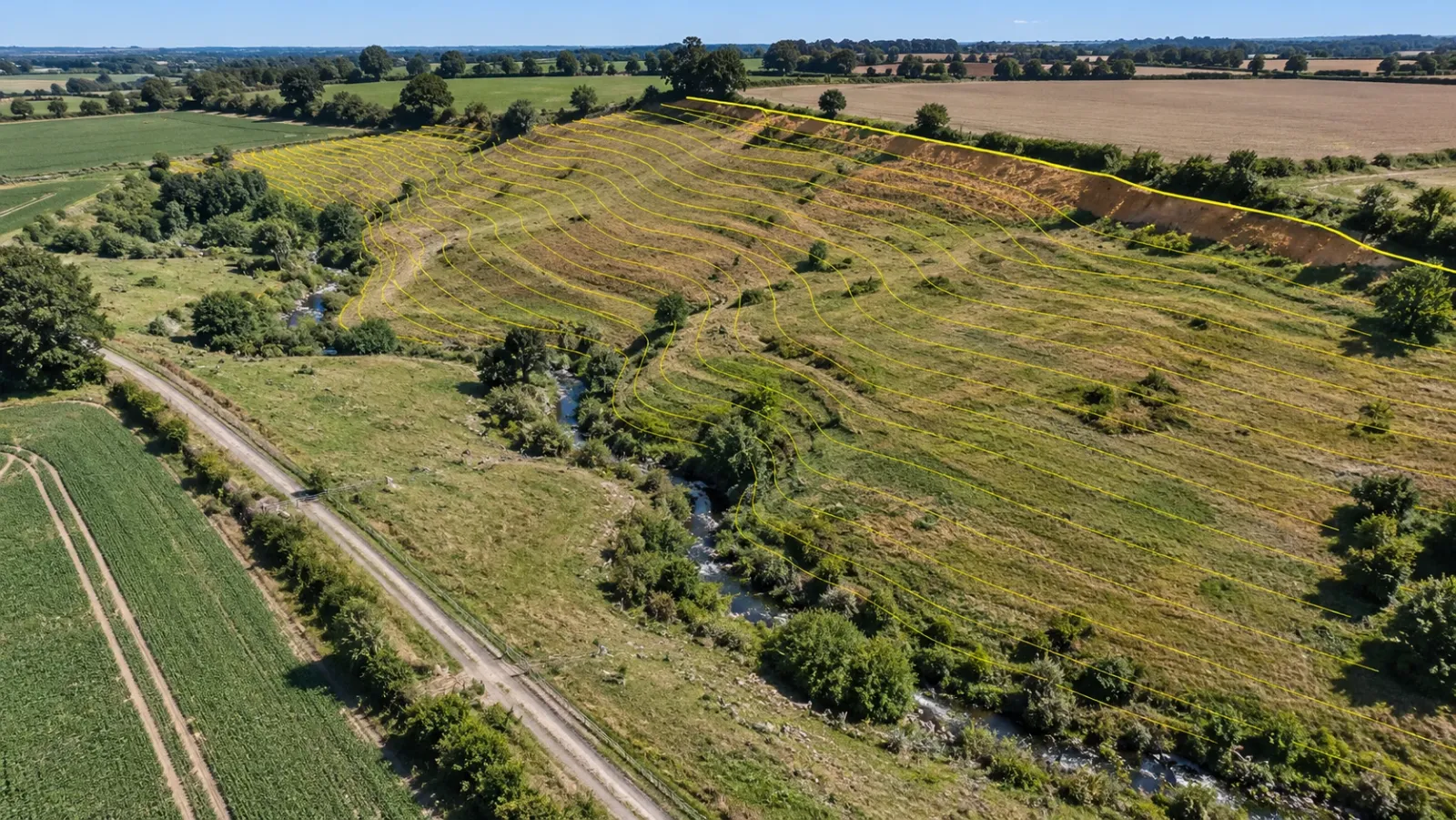
Executive Summary
- The Question: What is a drone topographic survey, what should it hand over, and how do you specify one so the result is fit for design?
- The Answer: A drone records the whole ground surface from the air; processing strips away vegetation and structures to leave the terrain, then adds contours, breaklines and mapped features. It beats walking the site on large, open or hazardous ground, and it needs ground instruments for hard detail and hidden terrain. A clear scope is what turns it into a usable topographic survey.
- The YelloSKYE Angle: Drone topography from Survey IQ arrives as design-ready terrain, contours and CAD and GIS exports, and is kept in the DEX platform so every later survey can be compared with it.
A drone topographic survey measures the shape of a piece of land and the features on it from the air. The drone captures overlapping, geotagged images over the whole site; software turns them into a 3D surface, removes everything that is not ground, and produces a terrain model, contours and mapped features tied to the project's coordinates. The result serves the same purpose as a conventional topographic survey, but it is built from a continuous surface rather than a few hundred hand-picked points.
That difference shapes everything about how you buy one. At YelloSKYE, topographic work runs through Survey IQ, our solution for land survey and terrain intelligence. This guide explains how a drone topographic survey is carried out, which deliverables make up a proper topographic package, where ground methods still do the job better, and what to put in the scope so the survey answers the questions your designers will ask.
What makes a survey "topographic"
A topographic survey has two halves. The first is relief: the levels of the ground, expressed as spot heights, a terrain surface and contour lines. The second is detail: the position of everything that sits on or cuts into the ground, such as buildings, roads, kerbs, fences, walls, ditches, trees, poles and visible utility covers.
On a conventional survey, a surveyor walks the site with a GNSS rover or total station and chooses where to take each reading: along the top and bottom of every bank, at each change of slope, on every kerb line and building corner. The terrain is then built from those points. The quality depends on the surveyor's judgement about where the ground changes.
A drone survey turns this around. It measures the ground surface almost everywhere at once, and the relief and detail are then extracted in the office. Judgement still matters, but it moves from the field to the desk: deciding what counts as ground, where the true edges are and which features need picking up on foot.
How a drone topographic survey is carried out
The flight itself is one step among several. For flight patterns, overlap and resolution, see drone mapping in construction; this section deals with what turns a mapping flight into a topographic survey.
Control on the ground
Before the drone flies, surveyed control points are set around and across the site in the coordinate system and height datum the designers will use. RTK or PPK positioning on the aircraft reduces how many are needed, but some control and independent check points remain the basis for trusting the levels. Our guide to ground control points for drone surveys covers how many to use and where.
Capture
The drone flies an automated pattern at a height chosen for the resolution the contours and features need. Sites with steep banks, cuttings or structures usually get a cross pattern or extra oblique lines so that slopes are seen from more than one direction.
From surface to terrain
Processing produces a dense point cloud and a surface model of everything the camera saw. Ground classification then separates soil, paving and grass from vegetation, vehicles, sheds and stockpiles, and the bare-earth terrain model is built from the ground points only. This is the step that most affects the contours, and it needs a person to review it.
Detail and breaklines
Features are digitised from the orthomosaic and the 3D data: building outlines, road edges, kerbs, fences, walls, tree canopies, drainage channels and visible covers. Breaklines are added along sharp changes in slope, so that the terrain model keeps the edges of banks, ditches and kerbs instead of rounding them off.
Ground infill and checks
Areas the drone could not see properly, such as dense woodland, deep shadow or hard detail needing exact levels, are surveyed on foot and merged in. Independent check points are compared against the finished surface to measure its accuracy.
What a drone topographic survey should hand over
A topographic survey is a package, not a single file. When it arrives, each part deserves its own quick check.
| Deliverable | What it gives the design team | What to check when it arrives |
|---|---|---|
| Digital terrain model (DTM) | Bare-earth levels for grading, drainage and earthwork design | No leftover bumps where vehicles, sheds or bushes stood |
| Digital surface model (DSM) | Top-of-everything heights for clearances, canopy and structures | Used only where tops matter, never as the ground |
| Contours | Readable picture of slope for layouts and planning drawings | Interval matches the brief; lines are smooth, not jagged |
| Breaklines | Sharp edges at banks, ditches, kerbs and walls | Present at every obvious change of slope |
| Spot heights | Levels at key points such as road crowns, thresholds and low points | Spread sensibly, not only on easy open ground |
| Feature linework | 2D or 3D lines for buildings, roads, fences, trees and covers | Layers named and coded as your CAD standard expects |
| Orthomosaic | Scaled image backdrop for checking linework and context | Aligns with the linework without visible shift |
| Survey report | Control used, coordinate system, datum and check point results | Accuracy measured on independent check points |
Why breaklines deserve their own line item
A terrain model built from a grid or a mesh of points tends to smooth across sharp edges. On open grassland that hardly matters. On a site with road edges, drainage ditches, retaining walls or the top and toe of an embankment, it matters a great deal: a ditch can lose its depth, a kerb can turn into a gentle slope, and the earthwork quantities move with them. Breaklines force the surface to honour those edges. If a quote does not mention them, ask whether they are included and how they are captured, by digitising from the 3D data, by ground survey, or both.
Planimetric detail has limits too
Everything mapped from the air is seen from above. A drone survey records the edge of a roof rather than the face of a wall beneath it, the outline of a tree canopy rather than the trunk position, and a manhole lid rather than the pipe inverts below it. Utility locations underground need a separate utility survey. State in the scope which features must be measured on the ground.
Drone or ground: which wins where
Neither method is better in general. Each wins on particular ground and for particular questions.
| Site condition or need | Better suited | Why |
|---|---|---|
| Large open parcel, farmland or cleared land | Drone | Whole surface recorded in one mobilisation, no gaps between picked points |
| Steep slopes, quarries, landfill, active earthworks | Drone | Nobody has to walk unsafe ground or haul roads |
| Drainage and flood studies | Drone | Small dips and flow paths show up in a continuous surface |
| Repeat surveys for change and volumes | Drone | Same flight plan and control give comparable surfaces |
| Dense woodland or thick scrub | Ground (or LiDAR plus ground) | Camera surveys see canopy, not soil |
| Drainage inverts, floor levels, thresholds | Ground | Points are hidden or need exact readings on a defined spot |
| Small urban plot hemmed in by buildings | Ground, often | Tall neighbours, overhangs and airspace limits reduce what a drone can do |
| Legal boundary definition | Licensed surveyor on the ground | The drone map can support review but carries no legal weight |
| Tight-tolerance hard surfaces, such as resurfacing a road | Ground | Design needs very precise levels on defined lines |
Where the drone clearly wins
The advantage is greatest when a site is large, open and awkward to walk. A ground crew samples the terrain; the drone records it all, so subtle low points, informal tracks and erosion channels appear even where nobody thought to take a reading. That makes drone topography especially useful at feasibility stage, when nobody yet knows which parts of the site matter. YelloSKYE's drone land survey for site feasibility uses exactly this: one mobilisation gives terrain models, boundary checks, land-cover classification and preliminary cut and fill before the parcel is bought.
Where ground methods keep the job
Ground instruments remain the right tool wherever the point that matters is hidden from above or must be measured on a precise spot: inverts, thresholds, the underside of structures and ground beneath canopy. They also set the control the drone survey depends on.
The usual answer is both
Most good topographic surveys are mixed: the drone captures the open ground and the context, while GNSS and total station fill hidden areas, confirm hard detail and set control. The hybrid construction survey guide covers joining the two datasets so they agree.
How to scope a drone topographic survey
Most disappointing topographic surveys trace back to a vague brief rather than a poor flight. A one-page scope that covers the items below avoids most of the arguments later.
| Scope item | What to state | Why it matters |
|---|---|---|
| Purpose | Feasibility, detailed design, earthwork baseline or planning submission | Sets the accuracy, detail and deliverables needed |
| Boundary | Site extent as a KML or DWG, plus a buffer beyond it | Designers nearly always need levels just outside the line |
| Coordinate system and datum | Horizontal system, vertical datum and units used by the designers | Prevents a survey that is correct but sits in the wrong place |
| Contour interval | The interval needed on the drawings | Drives flight height, control and processing effort |
| Accuracy and proof | Required vertical accuracy and a check point report | Makes accuracy a measured result, not a claim |
| Feature list | Which features to map and which to measure on the ground | Avoids missing items and duplicated effort |
| Ground cover | Woodland, crops, long grass, water and how to treat each | Decides whether LiDAR or ground infill is needed |
| Deliverables and formats | DTM, DSM, contours, breaklines, linework, orthomosaic; file types and CAD layer standard | Data opens in your tools without rework |
| Existing control | Any site benchmarks or earlier surveys to tie into | Keeps new and old data on the same reference |
| Constraints | Access, nearby airfields, restricted airspace, working hours | Affects permissions and scheduling |
Choose the purpose first
A feasibility survey for an acquisition decision and a detailed design survey for a drainage scheme need different things. The first values coverage and speed; the second values accuracy on hard detail and complete breaklines. Writing the purpose down helps the provider propose the right resolution, control and ground infill instead of over- or under-delivering.
Match the contour interval to the data
It is tempting to ask for very fine contours. If the terrain model cannot support them, the lines simply trace noise. Ask the provider what interval the planned set-up supports, and pick the coarsest one that still shows what the designers need to see. Flat sites, where drainage depends on small falls, generally need closer contours than steep ones.
Plan for ground cover and timing
Long grass, crops and foliage all hide the true ground. Flying after vegetation is cut, or when deciduous trees are bare, gives a cleaner terrain model, and standing water after heavy rain is a reason to reschedule.
Settle the formats and layers early
A survey that arrives in your coordinate system, file formats and CAD layer standard goes straight into design; one that does not costs days of cleaning.
How Survey IQ approaches topographic surveys
YelloSKYE flies RTK-GNSS-equipped drones together with ground control points. Survey IQ outputs include contour maps, georeferenced orthomosaics, terrain and surface models (DTM and DSM), slope analysis, point clouds and volumetric reports. Exports go out as DWG and DXF for CAD, GeoTIFF for GIS, LAS, LAZ and RCP for point clouds, and OBJ and FBX for meshes, so the data opens in tools such as AutoCAD, Revit, ArcGIS and Navisworks.
The survey then lands in the DEX platform. The terrain sits on a timeline with later flights, designers can lay CAD and BIM layers over it, and anyone with access can measure distance, area and volume from a browser. In practice, the topographic survey becomes the baseline for the rest of the project. The terrain-based design validation use case tests the layout against the drone terrain model before design lock-in, and the flood risk and drainage planning use case runs water flow analysis on the same surface to find low points and flow paths.
Checklist before you commission a drone topographic survey
- Write down the purpose and the decisions the survey has to support.
- Send the boundary file with a buffer, not just a drawing of the plot.
- Name the coordinate system, height datum and units the designers use.
- Agree the contour interval and required accuracy, and ask for a check point report.
- List the features to map, and mark which must be measured on the ground.
- Flag woodland, crops and water, and agree how hidden terrain will be filled in.
- Specify breaklines at banks, ditches, kerbs and walls.
- Fix the file formats and CAD layer standard before the flight.
- Confirm flight permissions with your country's aviation regulator (the FAA, the UK CAA and the UAE GCAA are examples), especially near airfields.
- Keep the survey somewhere the whole team can open it, so it can serve as the baseline for every later comparison.
Frequently asked questions
What is a drone topographic survey?
It is a survey of the shape of the ground and the features on it, captured from a drone instead of point by point on foot. Overlapping aerial images, tied to surveyed control, are processed into a bare-earth terrain model, contours, an orthomosaic and feature linework that designers can use in CAD and GIS.
Is a drone topographic survey as accurate as a ground survey?
On open, firm ground with good control, a well-run drone survey models the terrain very well and records far more of it than a ground crew can. Ground instruments remain more reliable for hard detail such as kerb levels, drainage inverts and floor thresholds, and for anything under dense trees. Ask for a check point report so the accuracy on your site is measured rather than assumed.
What contour interval can a drone topographic survey produce?
Software will draw contours at any interval, so the real limit is the vertical accuracy of the terrain model. Contours closer together than the data can support suggest precision that is not there. Agree the interval before the flight, because it affects the resolution, the control and the time needed on site.
Can a drone topographic survey map ground under trees?
A camera-based survey sees the canopy, not the soil beneath it, so terrain under dense trees is estimated. Drone LiDAR can reach the ground through gaps in foliage and does much better, but thick undergrowth still limits it. Heavily wooded areas are usually filled in with GNSS or total station points.
What information does a provider need to quote a drone topographic survey?
Send the site boundary as a KML or DWG file, the purpose of the survey, the coordinate system and height datum your designers use, the contour interval and feature list you need, and the file formats you want back. Mention vegetation, water, access limits and any nearby airfields, since these change the method and the permissions.