Ground Control Points for Drone Surveys: How Many, Where and When You Still Need Them
By Kush Agarwal, President and CEO, YelloSKYE. Published .
Executive Summary
- The Question: What do ground control points do in a drone survey, how many do you need and where do they go, and are they still needed when the drone has RTK or PPK?
- The Answer: Ground control points pin the drone model to the project's coordinates and stop it bending out of shape. The number and layout depend on site size, shape, relief and positioning method, not on a fixed rule. RTK or PPK cuts the number needed, but independent check points remain the only proof of accuracy.
- The YelloSKYE Angle: Survey IQ combines RTK-GNSS drones with ground control, and every controlled survey is stored in the DEX platform on the same coordinates as the ones before it.
Ground control points (GCPs) are marked targets on the ground whose coordinates are measured with survey instruments before or during a drone flight. In processing, those targets are found in the photos and their surveyed coordinates are used to lock the drone model to the project's coordinate system, at the right scale, orientation and height. Without them, or without a properly corrected alternative, a drone map can look perfect and still be in the wrong place.
How many GCPs you need, where they go and whether RTK or PPK lets you drop them are the questions that decide whether a survey can be used for design and quantities. YelloSKYE's drone surveys run through Survey IQ, which covers our land survey and terrain work and pairs RTK-GNSS-equipped drones with ground control. This guide explains what control does, how to plan a layout, how check points differ from control points, and the mistakes that most often spoil an otherwise good survey.
What ground control points actually do
Photogrammetry software can build a detailed 3D model from overlapping photos alone. That model is consistent with itself: shapes and relative distances look right. What it lacks is a reliable link to the real world, because a standard drone receiver knows its position only to within a few metres.
Ground control fixes four things at once:
- Position. The model is moved onto the correct coordinates on the project grid.
- Orientation. It is rotated and levelled so that north, east and up are correct, and slopes are not tilted.
- Scale. Distances in the model match distances on the ground.
- Shape. Spread across the site, control points hold the surface in shape, so that it does not sag into a bowl or rise into a dome between them, a known effect of weak camera calibration.
GCPs also bring the survey into the designers' own coordinate system and height datum. Drone geotags are recorded in a global system, with heights referenced to a mathematical ellipsoid; design drawings generally work on a projected grid with a local or geoid-based height. Measuring the targets in the project system carries that system into the drone data.
How many ground control points do you need?
There is no universal figure, and anyone quoting one without asking about the site is guessing. Three well-placed points are the mathematical minimum to fix position, orientation and scale, but with only three there is no redundancy: if one is wrong, nothing shows it. Using more lets the software and the surveyor see which point disagrees with the rest.
Beyond that floor, the number grows or shrinks with the factors below.
| Factor | More control needed when | Less control needed when |
|---|---|---|
| Site size | The area is large | The area is compact |
| Site shape | Long, narrow or irregular, like a road or pipeline | Roughly square |
| Terrain relief | Big height differences, cuttings, embankments | Flat or gently sloping |
| Drone positioning | Standard GNSS only | RTK or PPK with a well-surveyed base |
| Accuracy required | Design levels, earthwork billing, approvals | Visual records and rough areas |
| Ground texture | Large plain areas such as fresh asphalt or bare sand | Varied ground with plenty of features |
| Repeat surveys | Each flight must match the last exactly | One-off survey |
A useful way to think about it is coverage rather than count. Every part of the area that will be measured should sit reasonably close to a control point, and no part of the site should be left far beyond the outermost ones.
Where to place ground control points
Layout matters as much as number. A dozen points bunched near the site cabin do less than half that number spread properly.
Around the edge, then across the middle
Start with points near the corners and along the edges of the area to be measured, so that the whole site sits inside the control rather than outside it. On larger sites, add points through the interior to stop the surface drifting between the edges.
At high and low ground
Put control at both the highest and lowest parts of the site, not only on the flat. On a site with a deep cutting or a tall embankment, a model controlled only on level ground can be wrong in height exactly where the earthwork quantities are.
Inside good image coverage
Each target must appear clearly in several overlapping photos. Points placed right at the outer edge of the flight are seen in few images and at steep angles, so set them slightly inside the mapped area, or extend the flight a little beyond them.
On stable, open, visible ground
Choose flat, firm spots with a clear view of the sky. Avoid tree cover, the shadow of walls and buildings, soft ground that may settle, and haul roads where plant can move or bury a target.
Along corridors
For roads, pipelines, railways and transmission routes, place points in pairs or in a zig-zag on alternate sides of the alignment at regular intervals, with extra points at the ends, at sharp bends and where the gradient changes. This stops a long corridor model from twisting or bending along its length. YelloSKYE's linear corridor mapping work flies terrain-following routes for exactly this kind of asset, where a single consistent reference along the whole length matters.
Targets and how they are measured
The target itself
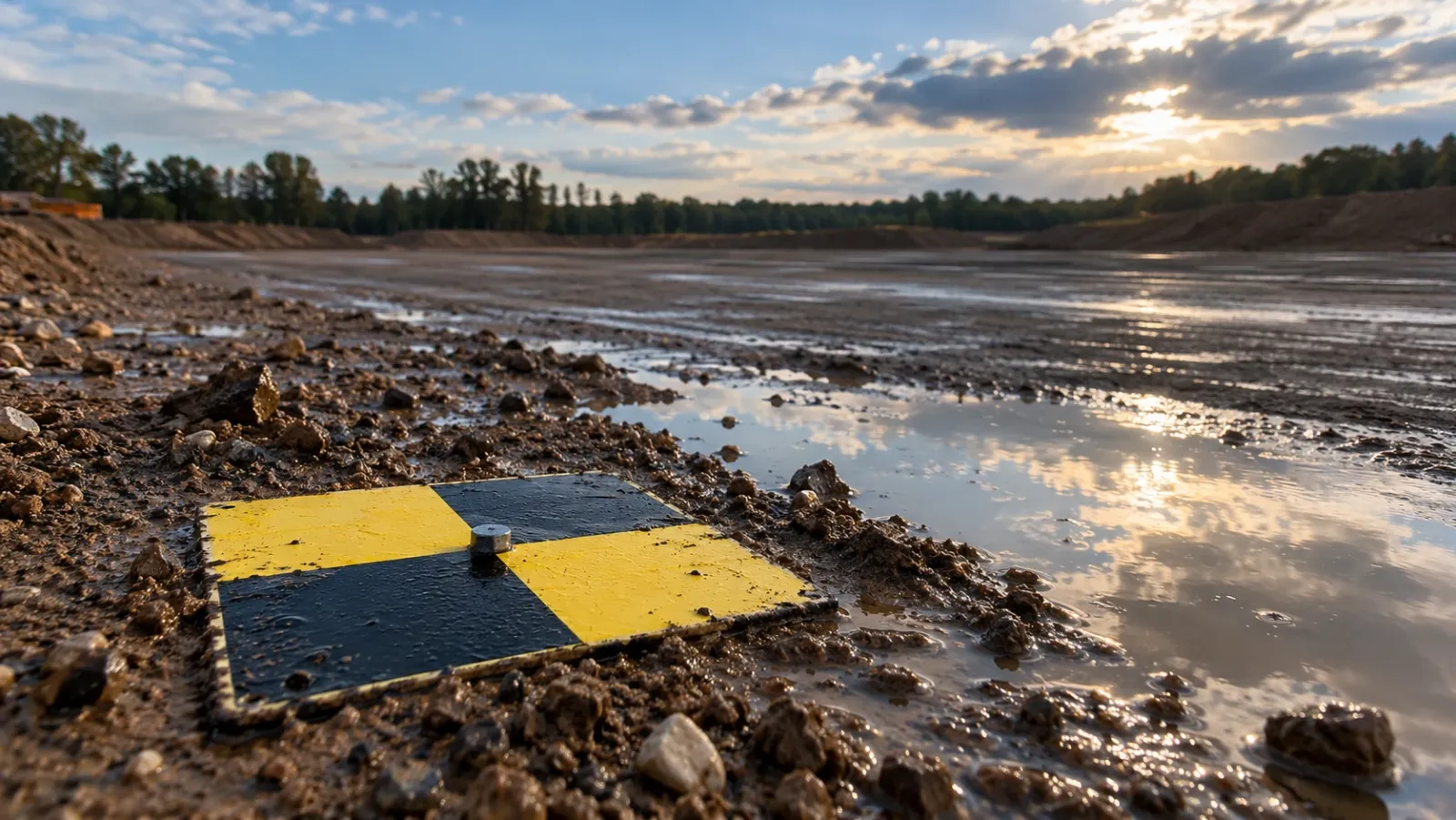
A good target is flat, matte and high-contrast, with a sharply defined centre such as the meeting point of a checkerboard or a cross. It should span many pixels at the planned ground resolution, so higher flights need bigger targets. On hard surfaces, a painted mark often works better than a loose board, which can blow away or be moved. For projects that will be flown repeatedly, permanent markers set in concrete or fixed to stable structures save setting out the same control every time.
The measurement
Each target centre is measured with a GNSS rover, working from a base on known control or from a correction network, or with a total station from the site control network. The measurement should be clearly more precise than the accuracy the finished map has to achieve, since any error in the control passes straight into the model. Record a point ID, a photo and a short description for every target, and measure targets close to the time of the flight so that nothing has moved in between.
RTK, PPK and when you still need GCPs
RTK (real-time kinematic) and PPK (post-processed kinematic) correct the drone's own satellite positions, during the flight or afterwards, so that each photo carries an accurate camera location. That allows the model to be placed on the ground with far less help from targets, often called direct georeferencing.
It does not remove every source of error:
- The base station coordinates. RTK and PPK positions are relative to the base. If the base sits on a point with poorly known coordinates, the whole survey shifts with it, and nothing in the data reveals it.
- Height datum and transformation. Corrected positions still need converting to the project's grid and height system. A wrong geoid model or local transformation gives a consistent offset everywhere.
- Vertical accuracy. Satellite positioning is weaker in height than in plan, and height is usually what earthwork and drainage design care about most.
- Camera calibration and timing. Small errors in the offset between antenna and camera, or in matching each photo to its position, show up as tilts and doming that targets would otherwise hold in check.
- Lost corrections. A dropped correction link on part of the flight leaves some photos far less accurate than the rest.
The common answer is a lighter control layout, not none at all.
| Positioning set-up | Ground control points | Check points | Typical use |
|---|---|---|---|
| Standard drone GNSS | Full layout around and across the site | Yes | Any survey that will be measured |
| RTK or PPK, base on known control | A small number, spread across the site | Yes | Topography, design checks, volumes |
| RTK or PPK, no GCPs | None | Still yes | Progress records and relative measurement, once check points pass |
Control points and check points are not the same thing
Both are surveyed targets on the ground, measured the same way. The difference lies in how they are used.
| Ground control point | Check point | |
|---|---|---|
| Used in processing? | Yes, to fix the model | No, held back on purpose |
| What its error tells you | How well the model was fitted to the control | How accurately the model predicts the ground |
| Can it hide a problem? | Yes, the solution is pulled towards it | No, the software never saw it |
| Figure to report | Supporting information | The accuracy of the survey |
Accuracy is normally reported as the root mean square error (RMSE) at the check points, separately for easting, northing and height. Published specifications such as the ASPRS Positional Accuracy Standards for Digital Geospatial Data take the same approach: accuracy is measured on independent points, not on the ones used to build the model. Check points should be spread across the whole site, including the interior and the areas that will be measured most, and they must never be moved into the control set to improve the numbers. How control and check results appear in the processing report is covered in our guide to drone image processing.
Common GCP mistakes
- Clustering. All the points near the access gate or along one road. The far side of the site is uncontrolled.
- Edge-only control on a big site. The perimeter is fine, but the middle sags or bulges.
- Ignoring relief. Control on flat ground only, with the cut or fill that matters left without a nearby point.
- Targets too small or blurred. The centre cannot be picked precisely, so every point carries extra error.
- Moved targets. A board shifted by wind, plant or a curious visitor after it was measured drags the model with it.
- Wrong point measured. The surveyor measures a corner of the target while the processor marks the centre.
- Mixed coordinate systems. Control in one grid or height datum and design in another, giving a survey that is precise and misplaced.
- No check points. Every surveyed target used as control, leaving no independent test of accuracy.
- Careless marking. Targets mis-identified or marked off-centre in the photos during processing.
Control for repeat surveys
When surveys are compared over time, for cut and fill or for progress, the control must stay the same from flight to flight. Otherwise an apparent change in volume may only be a change in reference. Set permanent control early, protect it from construction traffic and recheck it after heavy earthworks or storms. On YelloSKYE's earthwork volumetric analytics project, the DEX platform checked every new terrain model against the design grading plan, and client and contractor settled payments from the same volumes, viewed on the same platform. That only works when each survey sits on the same control. For how control is shared between drones, GNSS, total stations and scanners on one project, see our guide to hybrid construction surveys.
How YelloSKYE handles ground control
YelloSKYE flies RTK-GNSS-equipped drones and places ground control points for survey-grade results. On pre-acquisition land surveys, those control points are the only ground infrastructure the drone survey needs, so a single mobilisation produces the terrain, boundary and drainage data for a parcel. Data can be captured by YelloSKYE's certified pilots or by a client's own site team, and every controlled survey is published to DEX, where it sits on one timeline with earlier flights and with the project's CAD and BIM models. The same terrain then underpins the drone topographic survey deliverables, volumes and design checks that follow.
Ground control checklist
- Agree the coordinate system and height datum with the design team before any target is measured.
- Plan the layout on a map first: edges, interior, high and low ground, and corridor pairs where relevant.
- Use more than the minimum so that a bad point stands out.
- Size targets for the flight height, with a sharp centre and a matte, high-contrast pattern.
- Measure targets close to flight time and record an ID, photo and description for each.
- Hold back check points spread across the site, and report accuracy from them.
- With RTK or PPK, confirm the base coordinates and keep a few control points and the check points.
- Make control permanent on repeat surveys, protect it and recheck it after major earthworks.
Frequently asked questions
What is a ground control point in a drone survey?
A ground control point is a clearly visible target on the ground whose coordinates have been measured with survey equipment such as a GNSS rover or total station. During processing, the target is identified in the drone photos and its known coordinates are used to fix the position, orientation, scale and height of the whole model.
How many ground control points does a drone survey need?
There is no single number. Three points can fix a model mathematically, but they leave no way to spot a bad one, so practitioners use more and add points as the site grows larger, longer or steeper. RTK or PPK positioning on the drone reduces the number needed, while independent check points are needed in every case.
Do you need ground control points with an RTK or PPK drone?
Often fewer, but rarely none for survey work. RTK and PPK correct the camera positions, yet the result can still carry an error from the base station coordinates, the height datum or the camera calibration. A small number of control points and a set of check points confirm that the survey sits where it should.
What is the difference between a ground control point and a check point?
Both are surveyed targets. Control points are used in processing to fix the model; check points are deliberately left out and compared with the finished model afterwards. Because the software never fitted to them, check points give the honest measure of accuracy.
How big should a ground control target be?
Big enough to cover many pixels at the planned ground resolution, so that its centre can be picked precisely in every photo. Higher flights need larger targets. A flat, matte, high-contrast pattern with a sharply defined centre works best, and on hard surfaces a painted mark can replace a loose target.