Drone Mapping in Construction: How It Works, What It Delivers and How Accurate It Is
By Kush Agarwal, President and CEO, YelloSKYE. Published .
Executive Summary
- The Question: How does drone mapping actually work on a construction site, how accurate can it be, and where does it belong in a project?
- The Answer: A drone flies a planned pattern, taking heavily overlapping photos that software reconstructs into a measurable map and 3D surface. The flight pattern, resolution and ground control decide whether the result is a visual record or survey-grade data, so the right set-up depends on the question the map has to answer.
- The YelloSKYE Angle: Survey IQ plans each mapping flight around its use, from design-grade terrain to progress records, and delivers every map into the DEX platform on one timeline.
Drone mapping in construction is the capture of a site from the air in a planned pattern of overlapping photographs, which software then reconstructs into a true-to-scale map, an elevation model and a 3D view of the ground. The outputs can be measured, laid over the design and compared from one flight to the next, which is what separates mapping from aerial photography.
How useful the map is depends on decisions made before the drone takes off: the flight pattern, the resolution, the positioning method and the ground control. YelloSKYE's drone mapping work runs through Survey IQ, the land survey and terrain part of our offer. This guide explains the mechanics: how a mapping flight is designed, how images become a map, what accuracy you can expect at each level of set-up, what tends to go wrong, and where mapping fits in a project. If you mainly want to know what files a drone survey hands over, our guide to drone surveys in construction covers the deliverables in detail.
Mapping, surveying and photography: where the lines sit
The three terms are often used as if they mean the same thing. They do not, and buying the wrong one is a common source of disappointment.
| Aerial photography | Drone mapping | Drone survey | |
|---|---|---|---|
| Purpose | Show what the site looks like | Produce a measurable, georeferenced map | Produce measurements to a stated, checked accuracy |
| Flight | Manual, chosen angles | Automated pattern with planned overlap | Automated pattern with planned overlap |
| Positioning | Standard onboard GPS | Onboard GPS, often RTK or PPK | RTK or PPK plus ground control |
| Proof of accuracy | None | Optional | Checkpoint report |
| Good for | Marketing, quick updates | Progress records, logistics, rough quantities | Design, earthwork billing, approvals |
Put simply, all drone surveys are drone mapping, but a map only becomes a survey when its accuracy has been controlled and checked. For many day-to-day site questions, a well-flown map is enough. For anything that goes into a design or a payment, it needs to be a survey.
How a mapping flight is designed
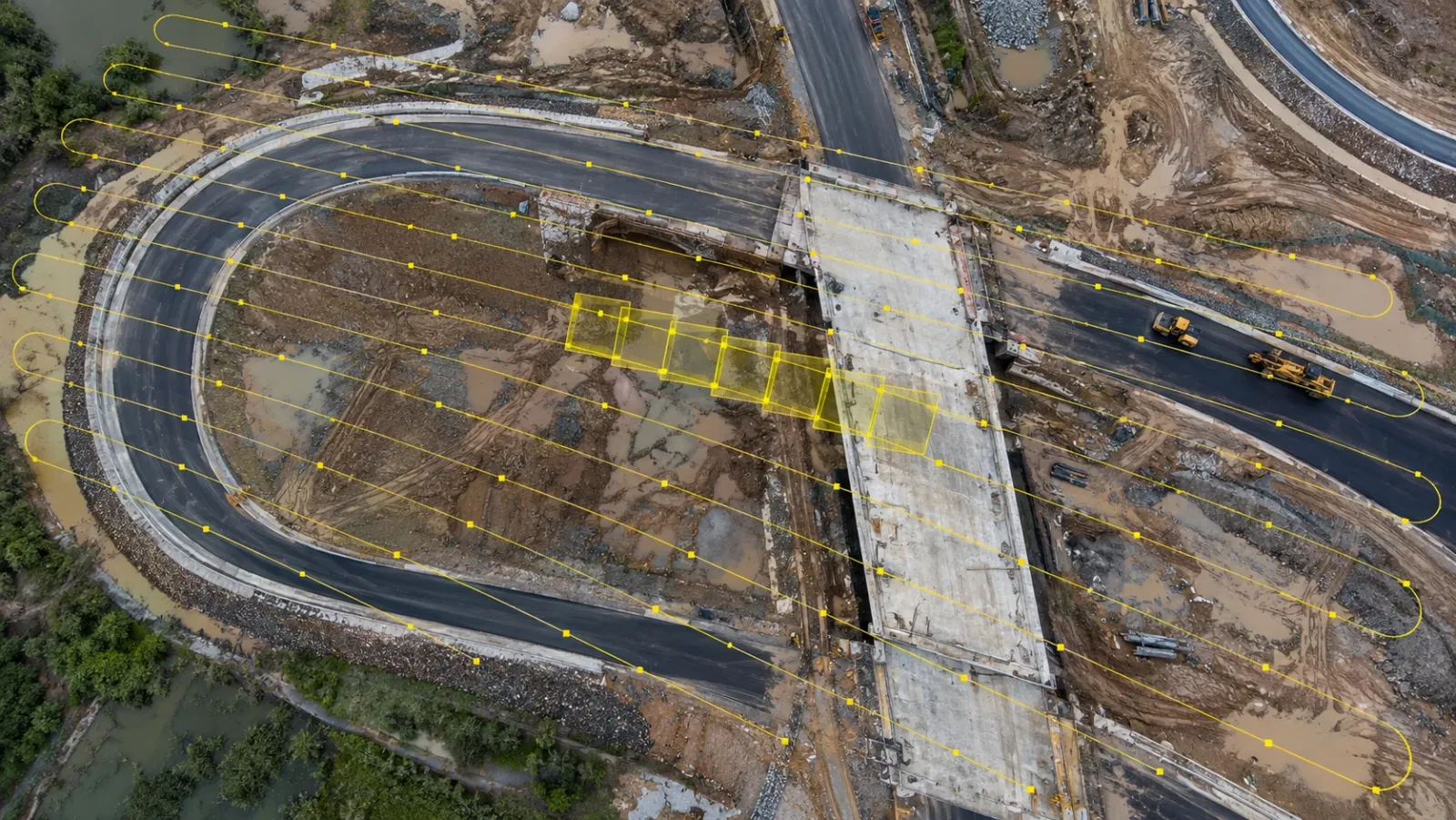
A mapping flight is planned on a screen before anyone goes to site. The drone then flies the plan automatically, triggering the camera at set intervals so that each photo shares a large part of its area with the next.
Flight patterns
Different shapes of site and different questions call for different patterns.
| Pattern | How it flies | Best for |
|---|---|---|
| Single grid | Parallel lines back and forth across the site, camera pointing straight down | Flat or gently sloping open sites, orthomosaics |
| Double grid | A second grid at right angles to the first | Sites with structures, cuts, stockpiles or steep ground, better 3D detail |
| Corridor | A few long parallel lines following an alignment | Roads, pipelines, rail and transmission lines |
| Oblique passes | Camera tilted, flying around a structure | Facades, retaining walls, tall elements and realistic 3D models |
Linear projects show why the pattern matters. On YelloSKYE's linear corridor mapping work, terrain-following flights along a narrow swath keep the resolution consistent as the ground rises and falls, and produce continuous orthomosaics and terrain models along the whole asset at five times the speed of conventional survey.
Height, resolution and overlap
Three settings trade against each other. Flying lower gives a finer ground sampling distance, the ground size of one pixel, so smaller features can be seen and measured. It also means more flight lines, more photos, more batteries and longer processing. Overlap, both along each line and between neighbouring lines, needs to be high so that every point on the ground appears in several photos. Uniform surfaces such as fresh concrete, bare soil or water, and sites with tall structures, need more overlap than ordinary ground.
The practical rule is to choose the resolution for the smallest thing you need to measure, then plan the flight around it, not the other way round.
Positioning and ground control
Standard satellite positioning on a drone can be out by a few metres. There are three ways to tighten that:
- RTK or PPK on the drone corrects the position of each photo, during the flight or afterwards.
- Ground control points are marked targets on the ground, measured with GNSS or a total station, that pin the map to the project's coordinate system.
- Checkpoints are extra surveyed targets left out of processing and used only to test the finished map.
Control should be spread around and across the area being mapped, not grouped near the site cabin. For repeat mapping, permanent control set at the start of the project keeps every later flight on the same coordinates.
How photos become a map
Processing follows a fixed sequence. The software matches thousands of identical features between overlapping photos, solves the position and angle of the camera for every shot, and from those solutions computes millions of 3D points describing the ground and everything standing on it. From that it creates a surface model, corrects every photo for tilt and terrain, and blends them into one orthomosaic. A terrain model is then made by filtering out vegetation, plant and structures to leave bare ground.
Each output answers a different question:
- Where is everything, and how big is it? The orthomosaic, a flat, measurable map. Our guide to what an orthomosaic is explains it in depth.
- How high is it, and how much material is there? The surface and terrain models, used for stockpiles, cut and fill and drainage.
- What does it look like in three dimensions? The point cloud and the textured mesh, used for engineering checks and stakeholder reviews.
Survey IQ delivers these in standard formats: GeoTIFF orthomosaics for GIS, DWG and DXF for CAD, point clouds in LAS, LAZ and RCP, and meshes in OBJ and FBX.
How accurate is drone mapping?
Accuracy is not a fixed property of a drone. It is the result of the set-up, and the set-up should match what the map will be used for. Over-specifying wastes time; under-specifying produces numbers nobody can rely on.
| What the map is for | Accuracy needed | Typical set-up |
|---|---|---|
| Visual progress record, stakeholder updates | Recognisable and consistently aligned | Automated grid, onboard GPS or RTK |
| Site logistics and layout checks | Relative accuracy good enough to measure areas and distances | RTK or PPK, consistent flight settings |
| Stockpiles and interim quantities | Reliable heights across the site | RTK or PPK plus ground control |
| Design, earthwork billing, approvals | Centimetre-level, proven on site | RTK or PPK, ground control and checkpoint report |
| Legal boundaries, structural setting out | Beyond drone mapping | Licensed surveyor with ground instruments |
Survey IQ terrain models reach centimetre-level accuracy with RTK positioning and ground control, which is suited to feasibility, planning submissions and engineering design. When comparing quotes, ask which kind of accuracy is being stated. Internal consistency (is a 20 m line on the map really 20 m?) is enough for areas and lengths. Placing the design on the map also needs the whole map to sit in the right place on the project grid.
What goes wrong in drone mapping
Most poor maps come from a handful of field and planning problems, not from the drone.
- Wind and battery limits. Strong wind pushes the drone off its lines and shortens flight time, leaving gaps in coverage.
- Low sun and moving cloud. Long shadows and patchy light make photos harder to match and the map uneven.
- Featureless or reflective surfaces. Water, glass, wet concrete and smooth bare soil give the software little to match.
- Things that move. Trucks, excavators and cranes appear in different places in different photos and leave ghosting.
- Vegetation. Photogrammetry sees the canopy, not the ground beneath it, so terrain under trees is estimated.
- Disturbed control. A ground control target knocked by plant moves the whole map with it.
- Changing settings. A different height or overlap from last month makes two maps disagree where nothing has changed.
Many of these can be managed by scheduling flights for steady, even light and quiet periods on site, protecting control targets, and fixing the flight plan once it works.
Where drone mapping fits in a project
Drone mapping is most valuable from the first look at the land through to the end of the structural frame, and less useful once work moves indoors.
| Project phase | What mapping answers | Typical cadence |
|---|---|---|
| Feasibility and acquisition | Usable area, terrain, drainage, access | One detailed baseline |
| Design | Does the layout sit on the real ground? | Baseline, refreshed if the site has changed |
| Site preparation and earthwork | Cut, fill, stockpiles, haul routes | Weekly, monthly or on demand |
| Structure | Footprints, frame progress, site logistics | Every few weeks |
| Fit-out and external works | Roads, landscaping, services outside the building | Monthly, plus a final as-built flight |
At the design stage, overlaying the CAD layout on a fresh terrain model catches level mismatches before they reach site, as in our terrain-based design validation use case. During construction, the same maps become a weekly record: on one development, weekly aerial progress capture gave the site team back over 15 hours a week of report writing.
Where drone mapping stops matters just as much. It cannot see inside a closed building, under dense canopy or onto every vertical face, and it is not a tool for millimetre setting out. Interiors need 360° capture or laser scanning, which is why YelloSKYE's Construct IQ combines drones with 360° and fixed cameras. Our guide to construction site mapping covers how aerial and ground capture are combined into one map.
Doing it in-house or using a provider
Some contractors buy drones and train their own pilots; others use a specialist. Either can work, and some projects mix the two.
| Consideration | In-house team | Specialist provider |
|---|---|---|
| Flexibility of timing | High once trained | Booked in advance |
| Pilot certification and permissions | Your responsibility | Handled by the provider |
| Ground control and survey checks | Needs survey skills on the team | Included |
| Processing and engineering analysis | Needs software and expertise | Included |
| Consistency across sites | Depends on each site team | Standard method across projects |
Whichever route you take, the data should end up in one place. YelloSKYE's DEX platform accepts captures from YelloSKYE's certified pilots or from a client's own site team, keeps every map on a single timeline, overlays CAD and BIM, and lets the team measure distance, area and volume in a browser. Wherever the site is, flying is regulated by the national aviation authority (the US FAA, the UK CAA or the UAE GCAA, for instance), so registration, pilot certification and any airspace permissions need to be in place before the first flight.
Next steps for a drone mapping programme
- Write down the question each flight must answer, then choose resolution, pattern and control to suit it.
- Decide which maps must be survey grade, and ask for a checkpoint report on those.
- Set permanent ground control early and protect it from plant.
- Fix the flight plan once it works, and reuse it for every repeat flight.
- Schedule flights for even light and quiet site periods.
- Plan for where mapping stops, with 360° capture and scanning lined up for when the building closes in.
- Keep every map in one shared platform so the whole team compares the same dates.
Frequently asked questions
What is the difference between drone mapping and drone surveying?
Drone mapping is the broader term for turning overlapping aerial photos into measurable maps and 3D models. A drone survey is drone mapping done to a stated, checked accuracy, with ground control and checkpoints, so the results can be used for design, quantities and approvals. Every drone survey involves mapping, but not every map is survey grade.
How long does it take to map a construction site with a drone?
The flight itself is usually the quick part; a typical building site can often be covered in one visit, and YelloSKYE's drone surveys cover 50 to 200 hectares per day. Setting ground control beforehand and processing the images afterwards take longer, and processing time grows with the number of images and the accuracy required.
Do you need ground control points for drone mapping?
Not for a visual record, but yes for anything you will measure or compare against the design. Ground control points, surveyed with GNSS or a total station, tie the map to the project's coordinates, and independent checkpoints prove the accuracy afterwards. RTK or PPK positioning on the drone reduces the number of points needed but does not remove the need to check.
Is photogrammetry or LiDAR better for construction mapping?
Photogrammetry, using a standard camera, suits most construction sites because it produces a sharp orthomosaic and accurate elevation data over open ground. LiDAR is worth the extra cost where dense vegetation hides the ground or where fine detail on complex structures matters. Many cleared or active sites never need it.
Can a construction company map its own site with its own drone?
Yes, if it has trained, certified pilots, suitable equipment and the right permissions from the national aviation authority, such as the FAA in the US, the CAA in the UK or the GCAA in the UAE. The harder part is keeping control, settings and processing consistent from flight to flight. Platforms such as YelloSKYE DEX accept data captured by certified YelloSKYE pilots or by a client's own site team.