Construction Site Mapping: Logistics, Earthwork and Progress on One Live Map
By Kush Agarwal, President and CEO, YelloSKYE. Published .
Executive Summary
- The Question: What does a construction site map need to contain, and how do you keep it accurate while the site changes every week?
- The Answer: A working site map layers current aerial imagery and elevation data with the design, the logistics plan and ground-level records. It stays useful only if each layer is refreshed at the rate that part of the site changes, and if aerial capture hands over to ground capture as the building closes in.
- The YelloSKYE Angle: Survey IQ and Construct IQ feed drone, 360°, fixed-camera and laser-scan data into the DEX platform, so logistics, quantities and progress are all read from the same dated map.
Construction site mapping means keeping a measurable, dated picture of the whole project that the site team, planners and commercial staff can all work from. It starts with a georeferenced drone map of the site, adds the design drawings and the logistics plan on top, and extends inside the building with ground-level capture once a drone can no longer see the work.
The point is not the map itself but the decisions it supports: where materials go, whether earthwork matches the design, and how far each area has progressed. At YelloSKYE the aerial base map comes from Survey IQ, our land survey and terrain solution, and the progress layers come from Construct IQ. This guide covers what belongs on a site map, how to use it for logistics, earthwork and progress, and how to keep it current from the first flight to the final walk.
What goes into a working site map
Most sites already have a site plan pinned to the wall of the cabin. It shows the intended layout on the day the contractor mobilised, and it starts going out of date within a week. A working site map is different because it is rebuilt from fresh capture, so it shows the site as it is, not as it was planned.
It is best thought of as a stack of layers, each with its own source and its own refresh rate.
| Layer | What it shows | Source | Typical refresh |
|---|---|---|---|
| Base imagery | The whole site from above, true to scale | Drone orthomosaic | Weekly to monthly |
| Elevation | Ground and stockpile heights, slopes, low points | Drone surface and terrain models | With each aerial flight |
| Design | Building footprints, grid, roads, levels, services | CAD drawings and BIM | When the design is revised |
| Logistics | Gates, haul routes, laydown, cranes, cabins, exclusion zones | Logistics plan drawn on the base imagery | When the site layout changes |
| Ground records | Interiors, MEP, hidden work, close-up detail | 360° walks, laser scans, fixed cameras | Weekly or continuous |
| Notes and issues | Observations, snags, safety items | Tags placed on the map by the team | Daily |
The base imagery is what makes the rest trustworthy. An orthomosaic is corrected so every part of it has the same scale and sits on real coordinates, which is why you can draw a laydown boundary or measure a haul road width on it. If that idea is new, our guide on what an orthomosaic is explains how it is produced.
Using the map for site logistics
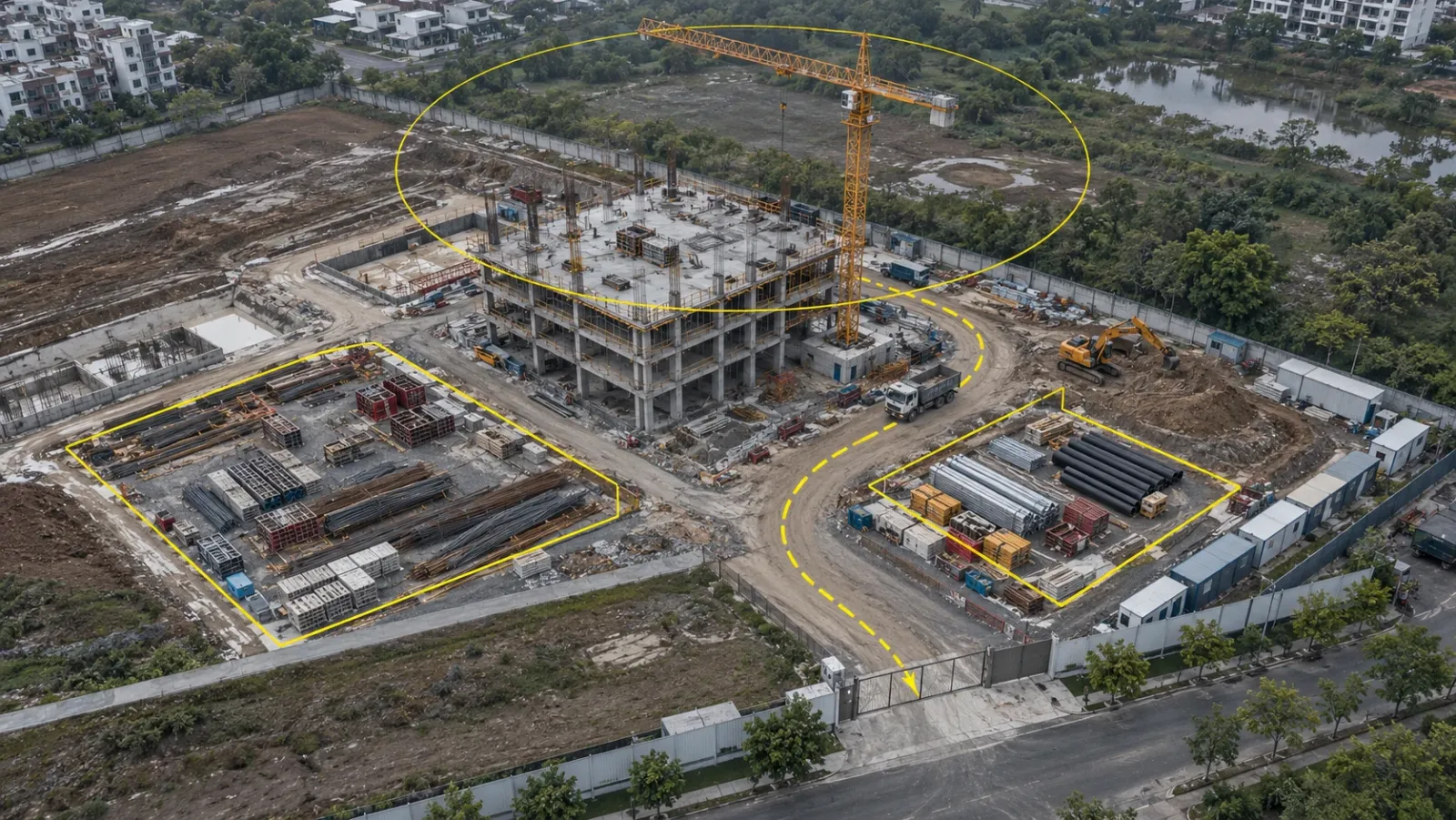
Logistics is the use of site mapping that teams most often overlook, and it is where a current map pays back quickly. A congested site loses time every day to trucks waiting at the gate, materials double-handled because they were dropped in the wrong place, and plant manoeuvring around stockpiles that were never meant to be there.
Laydown and storage areas
Laydown yards tend to grow. Pallets get dropped at the edge, deliveries arrive early, and within a month the yard has crept into an access lane or onto ground that is due to be excavated. Comparing this week's aerial map with the logistics plan shows the spread at a glance, and measuring the occupied area tells the site manager whether the next delivery will fit.
Haul routes, access and separation
Haul roads move as earthwork progresses. A current map shows the routes trucks are really using, where they cross pedestrian paths and where turning space has been lost. Redrawing the traffic management plan on a fresh map, rather than on the mobilisation drawing, keeps vehicle and pedestrian separation honest.
Crane and plant positions
Drawing the crane's reach on the base map shows which laydown areas it can serve and which loads will need a second lift or a mobile crane. As the structure rises and the site fills, the same overlay helps plan where the next piece of heavy plant can stand.
Buried services and temporary works
Before any new excavation, mark known services, drainage runs and temporary works on the map. A stockpile placed over a live service trench or a drainage outfall is easy to spot on an aerial map and hard to spot from the ground.
Housekeeping and drainage
After heavy rain, an aerial flight shows standing water, blocked site drainage and silt leaving the site, all of which affect access and environmental compliance. The elevation layer helps explain why water is collecting where it is.
Using the map for earthwork
Earthwork is the phase in which the site changes fastest and the money moves by volume. Each aerial flight produces an elevation model alongside the orthomosaic, so the map can show cut and fill against the design grading, stockpile volumes and how much material moved between two dates.
This turns quantity checks into something both the contractor and the client can see. When a highway contractor switched to YelloSKYE's automated earthwork volumetrics, quantity surveys that used to take a fortnight came back within hours, and the monthly arguments over how many cubic metres had moved stopped. The detail of setting up repeat earthwork flights is covered in our guide to drone construction progress tracking, so here the main point is simpler: earthwork quantities and the logistics plan should be read from the same map, because the stockpile that is inflating your fill numbers is often the same one blocking a haul road.
Using the map for progress
Once foundations and structure begin, the aerial map becomes a progress record. Overlaying the design on each new orthomosaic shows which footprints are poured, which roads are laid and which areas have not started. Because every map is dated and aligned to the same coordinates, two dates can be compared side by side to show exactly what changed.
On a multi-acre development using weekly aerial progress capture, the site team got back over 15 hours a week that had gone on compiling reports, payment disputes with contractors fell to zero, and review meetings shrank from two hours to half an hour, because the whole room was reading one map.
From aerial map to ground capture
A drone map is at its strongest from site clearance through the structural frame. As soon as the envelope closes, the drone sees a roof, and the work that matters moves inside: services routing, partitions, fit-out and everything hidden behind finishes. Many mapping programmes break at this point. The flights carry on, but the map stops answering the questions people are asking.
The fix is to plan the handover before it happens, and to think about the map by zone rather than by date. Different parts of the site need different capture at the same time.
| Site zone | What the team needs to see | Capture that keeps it current |
|---|---|---|
| Perimeter, roads and external works | Layout, access, landscaping, drainage | Drone flights, less often once sitework ends |
| Earthwork and stockpile areas | Levels, volumes, material movement | Drone flights with elevation models |
| Structure and roof | Frame progress, roof works, crane use | Drone flights, plus fixed cameras on key fronts |
| Interiors | Services, partitions, finishes, hidden work | 360° walks tied to the floor plans |
| Gates, crane bases, busy work fronts | Activity between scheduled captures | Fixed cameras on continuous capture |
| Plant rooms and complex built geometry | Measured as-built condition | Laser scanning |
Ground-level capture inside the building
With Construct IQ, interiors are recorded as navigable 360° digital twins that the team can walk remotely to tag problem areas, track MEP installations and compare conditions across dates. Starting these walks while the frame is still going up means the interior record already exists by the time the roof goes on. A walk just before walls and ceilings are closed is worth scheduling as a fixed step, because after that the only way to check what is behind a finish is to open it.
Continuous capture for busy zones
Fixed cameras fill the gaps between scheduled flights and walks. On one multi-phase project, fixed-camera monitoring combined with scheduled drone mapping gave continuous, timestamped visibility of selected work zones between flights. Across verified YelloSKYE deployments, this approach has meant up to 80% fewer site visits.
For a wider comparison of capture methods, see our reality capture guide.
Who owns the map
A site map goes stale fastest when everyone uses it and nobody is responsible for it. Agreeing ownership at the start avoids that.
- Survey or digital delivery lead: owns ground control, flight settings and the base map, so every flight lands on the same coordinates.
- Site or logistics manager: keeps the logistics layer current and redraws it whenever gates, routes or laydown areas move.
- Package and area engineers: add issues and observations as tags on the map rather than in separate photo folders.
- Commercial team: reads quantities and progress from the same map used on site, not from a separate export.
- Project manager or PMO: reviews the map in weekly meetings, so the map is the agenda rather than an attachment.
Why site maps go out of date
The same few problems come up on most projects:
- Irregular capture. Flights are booked when someone remembers, so the gaps fall exactly when the site is changing fastest.
- Inconsistent settings. Changing flight height or ground control between flights makes two maps look different even where nothing changed.
- Maps kept as files. Orthomosaics emailed as downloads end up on a few laptops, and the rest of the team never sees them.
- No handover inside. Aerial capture continues after close-in while interior capture never starts.
- Logistics drawn once. The logistics plan is drawn at mobilisation and never redrawn on newer imagery.
Holding every layer in one place deals with most of these. In YelloSKYE's DEX platform, each capture is filed on one timeline, CAD and BIM drawings sit over the site imagery, and anyone with access can take a distance, area or volume off the map in a browser, so the map stays a shared working tool rather than a folder of files.
A practical checklist for construction site mapping
- Fly a baseline before mobilisation and set permanent ground control that will survive the works.
- Draw the logistics plan on the baseline map, not on a blank site plan, and redraw it whenever the layout changes.
- Set a refresh rate for each zone: frequent flights over earthwork, less frequent over finished external works.
- Mark buried services and temporary works on the map before every new excavation.
- Start 360° walks during the frame, and fix a walk before each area is closed in.
- Add fixed cameras at gates, crane bases and the busiest work fronts.
- Name an owner for each layer, and review the map in the weekly project meeting.
- Keep every capture in one shared platform so site, commercial and leadership teams read the same map.
For more on how drone survey data itself is produced and checked, see our guide to drone surveys in construction.
Frequently asked questions
What is construction site mapping?
Construction site mapping is the practice of keeping an up-to-date, measurable map of a project, built from drone imagery, ground-level capture and the design drawings. Teams use it to plan logistics, track earthwork and check progress against the plan. Unlike a one-off survey, the map is refreshed on a schedule for the life of the project.
What should a construction site logistics plan show?
A good logistics plan shows site access and gates, haul routes, pedestrian routes, laydown and storage areas, crane positions and reach, welfare and office cabins, waste and wash-down areas, and known buried services. Drawn over a current aerial map rather than a blank site plan, it reflects what is actually on the ground and can be updated as the site changes.
How often should a construction site map be updated?
Update each part of the map as often as it changes. Earthwork areas and laydown yards may need weekly aerial capture, the structure every few weeks, and interiors a 360° walk every week or two once services go in. Busy zones such as gates or crane areas can be covered continuously with fixed cameras.
Can you map the inside of a building under construction?
Not with a drone once the envelope is closed. Interiors are mapped with 360° cameras walked through each floor, with every image tied to its position on the floor plan, and with laser scanning where measured geometry is needed. These ground-level records sit alongside the aerial map so the project keeps one record from site clearance to handover.
What software is used for construction site mapping?
Photogrammetry software turns drone images into orthomosaics and elevation models, and CAD or GIS tools hold the drawings. The practical need is a shared platform where aerial maps, ground capture, drawings and BIM sit on one timeline. YelloSKYE delivers this through its DEX platform, where teams can overlay CAD and BIM and measure distance, area and volume in a browser.