Drone Construction Progress Tracking: How It Works and Where It Fits
By Kush Agarwal, President and CEO, YelloSKYE. Published .
Executive Summary
- The Question: How do construction teams use drones to track progress, and what does a flight actually tell you?
- The Answer: A drone flies the same mission on a fixed cadence and each flight is processed into measurable maps and 3D surfaces. Comparing flights against each other and against the design shows what has been built, how much material has moved and where work is drifting.
- The YelloSKYE Angle: Construct IQ pairs scheduled drone flights with 360° walkthroughs and fixed cameras, so the progress record carries on once the structure closes in, all in one timeline on DEX.
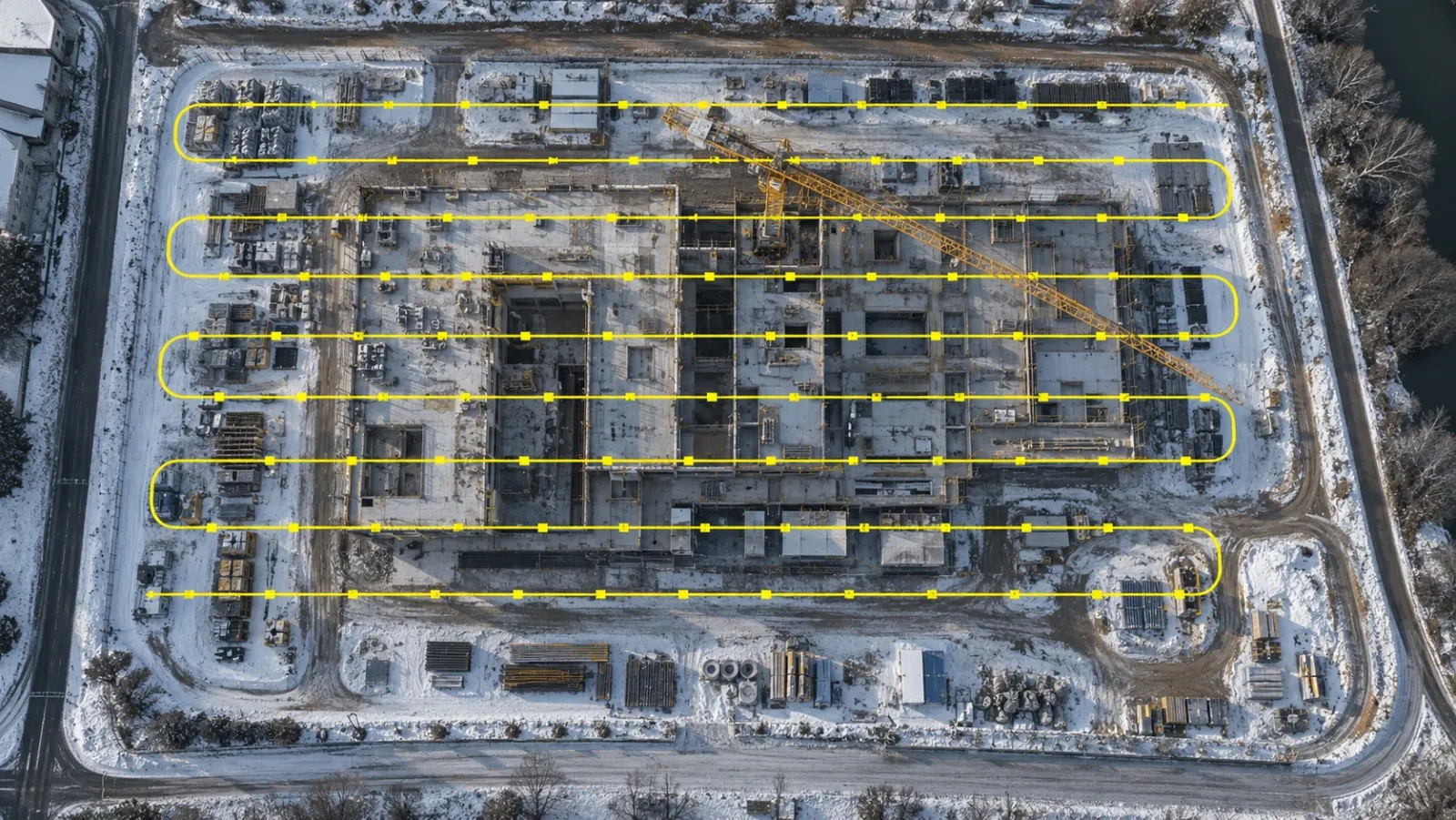
Drone construction progress tracking means flying the whole site on a fixed schedule, processing each flight into measurable maps and surface models, and comparing them over time to see what changed. It gives project teams one consistent, dated view of progress that does not depend on who walked the site or what they chose to photograph.
At YelloSKYE, aerial capture is the backbone of Construct IQ, our construction monitoring solution for developers, EPC contractors and PMOs. This guide explains what a drone flight measures, how to run a programme that produces comparable data, where aerial capture stops being useful, and how to connect it to billing and schedule decisions.
Why drones became the default for site-wide progress
On a large township, logistics park or highway package, the traditional progress update is a set of ground photos, a site engineer's notes and a spreadsheet. Each of those depends on who prepared it. Two engineers can walk the same site on the same day and report different completion figures.
A drone flight removes most of that variation. The same area is captured from the same height and path every time, and the output is a measurable map rather than a selection of images. On projects where progress often reaches leadership through WhatsApp photos and slide decks, that consistency is the main value: everyone, from the site team to the developer's board, looks at the same picture.
Drones also cover ground quickly. A site that takes a morning to walk can be flown in a fraction of that time, so updates can happen weekly instead of monthly.
What a drone flight actually produces
A drone captures hundreds of overlapping photographs. Processing turns that stack of images into a set of deliverables. A site engineer, a planner and a project director will each reach for a different one.
| Output | What it is | Who uses it | Typical question it answers |
|---|---|---|---|
| Orthomosaic | A single, scale-correct aerial map of the site | Project managers, PMOs, owners | Where does work stand across the entire site this week, and where has it moved? |
| Digital elevation model (DEM) | A surface showing ground height across the site | Civil engineers, earthwork contractors | Is the grading on plan, and how will water drain? |
| Point cloud | Millions of measured 3D points | Engineering and BIM teams | Does the built geometry match the design? |
| 3D model or digital twin | A textured 3D view of the site | Leadership, investors, remote stakeholders | Can someone who has never visited understand the site? |
| Volume calculations | Cut, fill and stockpile quantities between two surfaces | Commercial and quantity surveying teams | How much material has moved, and does it match the contractor's claim? |
| Aerial photos and video | High-resolution milestone imagery | Marketing, investors, management reviews | How is the project progressing as a whole? |
On the DEX platform, these outputs sit together on a timeline. Users can measure distance, area and volume from their desk, and point clouds can be exported in RCP, LAS and LAZ formats for engineering workflows.
Earthwork: where aerial tracking pays for itself first
Earthwork is usually the first phase where drone data makes a direct commercial difference. It is expensive, hard to measure by eye, and a frequent source of disputes with contractors.
Cut and fill against the design
Comparing the elevation model from the latest flight with the design grading plan shows exactly where the site is above or below finished level. Comparing two flights shows how much was excavated or placed between them.
Production rate
Compare the volume models from consecutive flights and you get the real output of the earthmoving fleet. As an illustration, 30,000 m³ of cut recorded across ten working days means crews are averaging 3,000 m³ a day. That number can be checked against the planned rate long before the schedule slips.
Stockpiles and haulage
Stockpile volumes for topsoil, fill and aggregate, measured on each flight, let the site team plan borrow and disposal against what is already lying on site. Keeping cut and fill balanced on site reduces paid external hauling.
In one YelloSKYE deployment on a highway extension, replacing manual survey cycles with drone topography cut survey turnaround from about two weeks to a few hours and brought billing disputes on earthwork to zero. The details are in our earthwork volumetric analytics use case.
How to set up a drone progress tracking programme
The quality of drone progress tracking depends less on the drone and more on discipline. A comparison between two flights is only meaningful if the flights were captured the same way.
Lock the flight parameters
Fix the flight path, altitude, image overlap and camera settings at the start of the project and keep them unchanged. A change in altitude or overlap can make two maps differ in ways that look like progress but are not.
Establish ground control
Ground control points, or an equivalent positioning method, tie every flight to the same coordinates. Without them, flights drift relative to each other and measurements lose reliability.
Set the cadence by phase
Flight frequency should follow the work. Heavy earthwork and structural phases need more frequent flights; finishing phases need fewer. Aligning at least one flight with each payment cycle means the record always matches the period being claimed.
Sort out regulations and airspace early
Each country regulates drone operations in its own way, for example under Part 107 in the United States, through the CAA in the United Kingdom and through the GCAA in the UAE. Registration of the aircraft, certification of the pilot and airspace permissions are covered by most regimes. Sites close to airports or defence areas need permissions planned well before mobilisation.
Decide who sees what
Name the people who need each output. A site engineer needs measurements; a PMO needs a progress view against schedule; a developer's leadership needs a portfolio summary. Agree this before the first flight so reports are built for their readers.
Keep one home for the data
Store every flight on one platform, alongside drawings and other site captures. Files scattered across drives and email threads defeat the purpose of a consistent record.
Where aerial capture stops: the case for multi-sensor tracking
Drones are strongest while the work is in the open. Once slabs stack up and the envelope closes, the aerial view shows the roof, the façade and site logistics, and little else. That is the stage where a large share of cost and schedule risk sits: MEP rough-in, blockwork, finishes and fit-out.
The answer is not more flights. It is the right sensor for each stage.
| Project stage | What the drone shows well | What it cannot see | What takes over |
|---|---|---|---|
| Land and pre-construction | Terrain, drainage, access, boundaries | Subsurface conditions | Geotechnical investigation, Survey IQ topography |
| Earthwork and enabling works | Cut and fill, stockpiles, haul roads, trenches | Services once backfilled | Capture before backfill |
| Foundations and structure | Pours, slab cycles, steel erection, crane and laydown areas | Lower floors once covered | 360° walkthroughs floor by floor |
| Envelope | Roofing, façade progress | The inside face of every wall | 360° capture and fixed cameras on key zones |
| Interiors and fit-out | Site logistics only | MEP, partitions, finishes | 360° interior digital twins |
| Handover | External works, landscaping, final condition | Concealed services | Earlier 360° records and laser scans for as-builts |
Fixed cameras add a third layer. They provide a continuous view of selected zones between scheduled flights, record milestones automatically and build time-lapse footage for reporting. Our fixed-camera construction monitoring use case shows how this fills the gap between aerial captures.
Where geometry matters more than appearance, such as checking structure against a BIM model, terrestrial laser scanning gives the detail a drone cannot. BIM IQ covers that workflow.
The important point is that all of these should feed one record. When the drone maps sit in one system and the interior captures in another, the PMO is back to merging them by hand in a weekly report, which is the manual work drone tracking was meant to remove.
Turning flights into decisions
A map on its own does not change a project. The value comes from connecting what the flight shows to the decisions that depend on it.
Contractor billing
payment claims are often approved on the basis of site logs and verbal updates. With a flight timed to each billing cycle, the contractor, PMO and developer review the same dated evidence. In our contractor billing use case, project managers made 80% fewer physical site visits for verification.
Schedule and planned-versus-actual
Construct IQ overlays actual progress against the planned schedule, so deviations show up early rather than at the monthly review. Alerts can flag when critical milestones are reached or when activity stops in high-priority zones.
Stakeholder reporting
Weekly aerial updates give leadership, lenders and investors a view they can read without a site visit. In one YelloSKYE deployment on a multi-acre development, weekly aerial progress capture saved site managers more than 15 hours a week on manual reporting and cut stakeholder meetings from two hours to 30 minutes.
Disputes and compliance
Because every flight is dated and stored, the record shows what was in place and when. That helps with contractor disputes, handover discussions and the progress updates owners give lenders, investors and buyers.
Drone tracking compared with traditional progress methods
| Factor | Manual site walks and photos | Drone progress tracking |
|---|---|---|
| Coverage | Wherever the engineer walked | The whole site, every flight |
| Consistency | Varies by person and day | Same path, height and settings each time |
| Measurement | Estimated or separately surveyed | Distances, areas and volumes from the map |
| Time to update | Hours on site plus report preparation | Short flight plus processing |
| Evidence for disputes | Selected photos | Complete, dated, measurable record |
| Interior visibility | Yes, if photographed | No; needs 360° or fixed cameras |
Drone surveys do not replace every survey task. Formal certification of levels, legal boundaries and setting-out still belongs to a qualified surveyor. What drones replace is the frequent, site-wide progress snapshot that manual methods struggle to produce consistently.
How YelloSKYE delivers drone progress tracking
Construct IQ follows a simple sequence:
- Capture. Our certified pilots, or your on-site teams, fly scheduled drone missions and add 360° and fixed-camera capture where the project needs it.
- Process. Data is uploaded to DEX, which builds the aerial map, terrain and surface models, point cloud and digital twin, then lines them up against your CAD or BIM drawings.
- Analyse. DEX calculates volumes, flags deviations from plan and updates the progress dashboard.
- Decide. Teams approve bills, resolve issues and report to leadership from the same time-linked record.
For developers running several sites at once, DEX brings every project into one dashboard so leadership can compare progress on a common baseline instead of relying on each site reporting in its own format. DEX also integrates with Procore, Autodesk BIM 360 and ACC, so progress data can flow into tools your teams already use.
Start with a clear capture plan, keep every flight comparable, and decide before the first flight how the record will continue once the building closes in. That is what separates a set of attractive aerial photos from a progress record that holds up in a billing review.
Frequently asked questions
How often should a drone fly to track construction progress?
Match the cadence to the pace of work and your billing cycle. Weekly or fortnightly flights suit most building and infrastructure sites, with more frequent flights during heavy earthwork. Many teams also time a flight just before each progress payment claim so the record matches the claim period.
Is drone progress tracking accurate enough to verify contractor bills?
For quantities such as cut and fill, stockpiles and visible structural progress, aligned drone surveys give a consistent, measurable record that both parties can review. Accuracy depends on repeatable flight parameters and proper ground control. Work that needs formal certification, such as final levels or legal boundaries, should still be signed off by a qualified surveyor.
Do you need permission to fly a drone on a construction site?
In almost every country, yes. Commercial drone flights fall under the national aviation authority, such as the FAA in the United States, the CAA in the United Kingdom or the GCAA in the UAE. Rules typically cover drone registration, remote pilot certification and airspace permissions, and sites near airports or other restricted areas need specific approval before any flight.
What can't a drone see on a construction site?
A drone cannot see inside an enclosed structure, under stacked slabs, or behind facades once they are closed. Interior progress such as MEP rough-in, blockwork and finishes needs 360° capture, and continuous activity in specific zones is better covered by fixed cameras.
How quickly can drone progress tracking start on a new project?
With YelloSKYE Construct IQ, most projects are set up and first captured within 48 to 72 hours. The team handles mobilisation, flights and platform onboarding, and results are delivered through the DEX platform.