What Is a Point Cloud? Capture, Accuracy, Formats and Use on Live Projects
By Kush Agarwal, President and CEO, YelloSKYE. Published .
Executive Summary
- The Question: What is a point cloud, where does it come from, and what should a project team understand before relying on one?
- The Answer: A point cloud is a dense set of measured 3D points that records the surfaces of a site or building as they stand. Laser scanners, drone photogrammetry and phone sensors all produce them, with very different density and accuracy. On its own it is a measurement, not a model; value comes from registering it, cleaning it and comparing or modelling it against design.
- The YelloSKYE Angle: BIM IQ takes point clouds from laser scanners and drone surveys, places them on project coordinates and turns them into as-built BIM models and deviation checks.
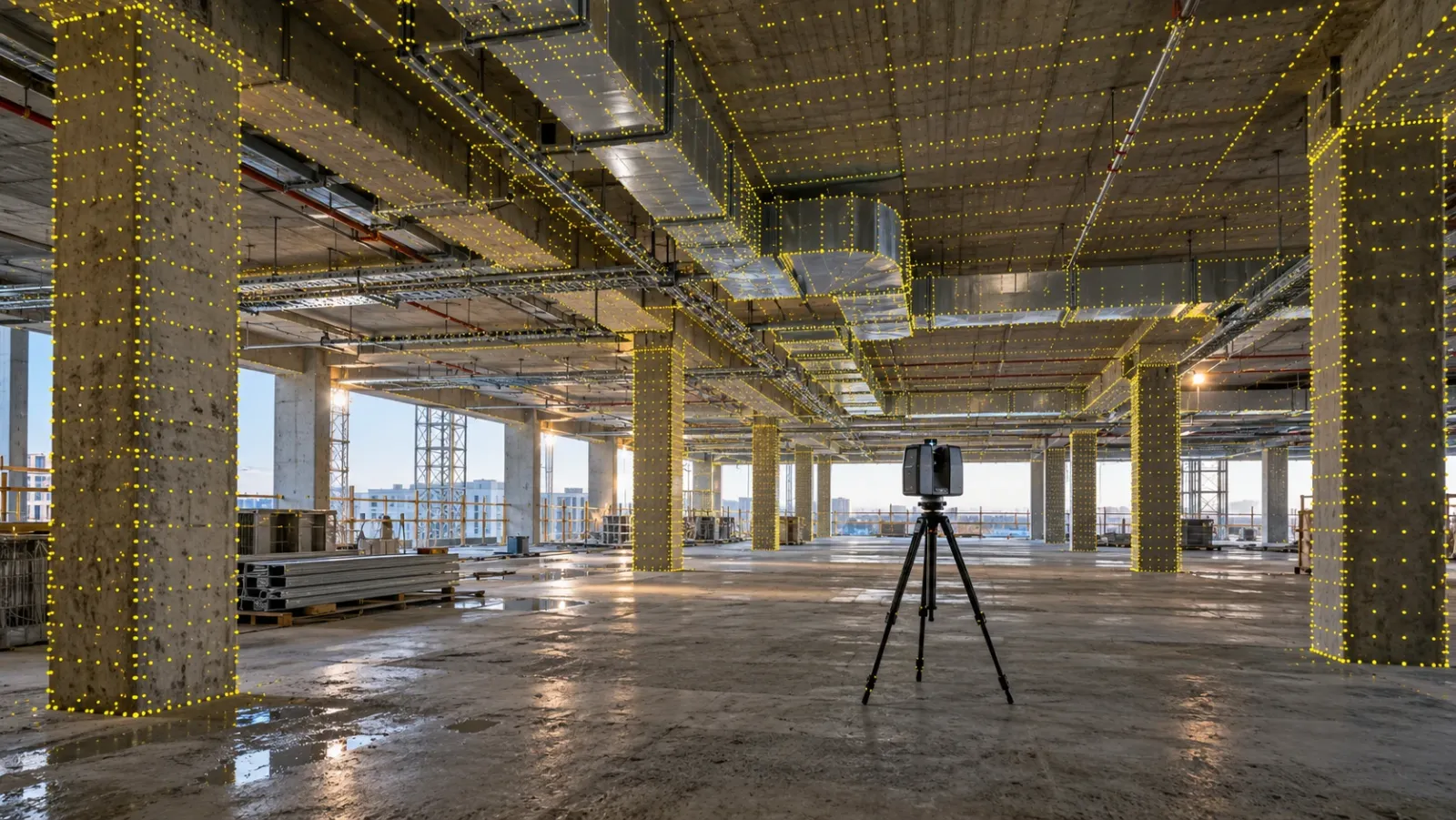
A point cloud is a collection of measured points in three-dimensional space, each one a single position on a real surface with X, Y and Z coordinates and, usually, a colour. Captured in their millions, the points describe floors, walls, columns, ducts, terrain and everything else the sensor could see, so the cloud becomes a measurable 3D record of a place on the day it was captured.
On construction and renovation projects, point clouds are the bridge between the physical site and the digital model. YelloSKYE's BIM IQ uses them to build as-built models and to check built work against design. This guide explains what is inside a point cloud, how the main capture methods differ, what density and accuracy really mean, which file formats to ask for, how a cloud becomes BIM or CAD, and where teams trip up when they use clouds on live projects.
What a point cloud contains
Think of every point as a small row in a very long table. The coordinates are the only thing every point must have; the rest depends on how it was captured.
| Attribute | What it records | Where it comes from |
|---|---|---|
| X, Y, Z | Position of the point on a surface | Every capture method |
| Colour (RGB) | The colour of the surface at that point | Scanner camera or the source photos |
| Intensity | How strongly the surface reflected the laser | Laser scanners and LiDAR |
| Return number | Which echo of a laser pulse produced the point | Aerial LiDAR |
| Classification | A label such as ground, vegetation or building | Added during processing |
| Normal | The direction the surface faces | Calculated during processing |
| Time or scan ID | When, or from which position, it was recorded | Scanners and mobile systems |
What a point cloud does not contain is meaning. The software showing it has no idea that one group of points is a column and another is a temporary prop. That interpretation is human or algorithmic work done afterwards, and it is where most of the cost of using a cloud sits.
Three ways to capture one
Point clouds come from three broad families of sensor. They produce files that look alike on screen but differ a great deal in what they can be trusted for.
Laser scanning
A laser scanner measures the distance to surfaces with laser light while sweeping through a wide field of view. Tripod scanners record from a series of fixed positions; handheld and backpack units record continuously while the operator walks; aerial LiDAR does the same from a drone or aircraft. Laser data is measured directly and works in poor light, which is why it is the normal source for interiors, structure and building services. Our guide to laser scanning in construction compares the scanner types.
Photogrammetry
Photogrammetry software finds the same features in many overlapping photographs and calculates their 3D positions. From a drone, it gives coloured clouds of whole sites, earthworks, roofs and facades at low cost. It struggles on plain, shiny or dark surfaces and cannot see under vegetation. When each method is the better choice is set out in photogrammetry vs LiDAR.
Phones and tablets
Some phones and tablets carry a small depth sensor that can build a rough cloud of a room or a service run in minutes. These clouds are useful for context and quick dimensions but drift over distance and carry no survey control. Our guide to phone and tablet LiDAR covers what they can and cannot do.
| Capture method | Typical scale | Strength | Weakness |
|---|---|---|---|
| Tripod laser scanner | Rooms, floors, structures, facades | Most precise at close range | Slow; many set-ups to join |
| Mobile laser scanner | Whole floors, corridors, tunnels | Fast coverage while walking | Drift over long routes |
| Aerial LiDAR | Terrain, corridors, wooded land | Reaches ground through gaps in vegetation | Not for interiors or element checks |
| Drone photogrammetry | Sites, earthworks, roofs, facades | Large areas, rich colour, low cost | Needs light and texture; no interiors |
| Phone or tablet sensor | A room or a single service run | Quick and always to hand | Short range, drift, no control |
Density and accuracy are not the same thing
Two numbers are often quoted for a point cloud, and they answer different questions.
Density, or point spacing, describes how close together the points are: for example, one point every few millimetres on a wall, or a number of points per square metre on terrain. Higher density shows smaller features and sharper edges. It does not, by itself, make the points more correct.
Accuracy describes how close each point is to where the surface really is. It has two parts. Precision, sometimes called noise, is how tightly the points sit on a flat surface; a noisy cloud shows a wall as a fuzzy layer rather than a crisp plane. Absolute accuracy is how well the whole cloud sits on the project's coordinates, which depends on survey control and on how well individual scans were joined together.
A dense cloud can be badly placed, and a sparse cloud can be well placed. For a deviation check against design, ask for both: enough density to resolve the elements you care about, and accuracy proven by control and a registration report. The accuracy bands used to specify this for modelling, known as levels of accuracy, are explained in our guide to what scan to BIM is.
File formats you will meet
Point cloud formats differ in how much they store, how big they are and which software reads them. The safest arrangement is a working copy in the format your team's software opens best, plus a neutral archive copy.
| Format | What it is | Typical use |
|---|---|---|
| LAS | Binary format maintained by ASPRS, the US photogrammetry and remote sensing society | Drone and aerial survey data, GIS |
| LAZ | Losslessly compressed LAS | Same as LAS, at a fraction of the file size |
| E57 | Vendor-neutral standard published by ASTM for 3D imaging data | Exchanging laser scans between software |
| RCP / RCS | Autodesk ReCap project and scan files | Bringing clouds into Revit, Navisworks and AutoCAD |
| PTS / PTX | Text-based scanner exports | Older workflows and simple exchange |
| XYZ | Plain text, one point per line | Quick exchange; loses most attributes |
| PLY | Polygon file format, also used for points | Research tools and some photogrammetry software |
BIM IQ accepts clouds made by drone photogrammetry or by the main scanner brands (Leica, FARO, Trimble, Matterport), in .las, .e57, .rcp, .pts, .xyz or .pcg, and can export RCP and LAS as well as DWG, DXF, OBJ and FBX.
How a point cloud becomes BIM or CAD
A cloud is a starting point. Turning it into something a designer or site team can act on follows a consistent path.
- Register. Individual scans, or flights, are joined into one cloud and tied to survey control, so the cloud shares coordinates with the design.
- Clean. People, vehicles, scaffolding, stored materials and reflections are removed or classified so they are not mistaken for permanent work.
- Segment. The cloud is split by floor, zone or system, which keeps files manageable and lets each discipline work on its own part.
- Use it in one of two ways. Either model elements from the cloud, producing walls, slabs, columns and services at an agreed level of development, or compare the cloud with the existing design model and report where built work departs from it.
- Extract 2D where needed. Horizontal and vertical slices through the cloud give plans, sections and elevations for CAD.
- Deliver with evidence. The model or drawings travel with the registered cloud, the registration report and any deviation report.
BIM IQ's as-built models range from LOD 200 up to LOD 400, set by the capture method and the project's needs; most renovation and as-built verification jobs land at LOD 300 to 350. It works with Revit, Navisworks, ArchiCAD and IFC. The renovation use case shows the pattern on an existing building: laser scans are modelled into a design-ready as-built before anyone fixes the retrofit scope. The full modelling process is explained in what is scan to BIM, and how the model and site data stay in step through a project in reality capture and BIM.
Pitfalls on live projects
Using point clouds on an active site is harder than scanning an empty existing building. These are the problems that come up most.
- Temporary works in the cloud. Props, scaffolding, formwork and stacked materials look like structure to software. Agree what will be cleaned out before modelling or comparison starts.
- Wrong or missing coordinates. A cloud on a local scanner origin will not line up with the design model. Give the capture team the site control points and make tying every scan to them part of the scope.
- Mixed units and datums. Millimetres against metres, or two height references, produce clouds that are offset or scaled. Fix these in the scope.
- Shadows behind objects. A scanner cannot see behind a column or above a duct. Areas that matter need extra positions, or a note that they were not captured.
- Timing. A cloud records one day. Scan once the work to be checked is finished but before it is hidden by the following trade; our clash detection work times scans to structural milestones such as a slab pour so deviations surface before services go in.
- Files nobody can open. Handing a site team a very large raw cloud without the software or skills to use it wastes the capture. Ask for the deliverable they will actually use, such as a deviation report or a model, and archive the cloud.
- Confusing a visual record with a measured one. Where the question is what a room looked like on a date rather than exactly where an element sits, a 360° walk is quicker and cheaper, as in our interior fit-out work.
Where point clouds fit in a shared record
A point cloud is most useful when it sits next to everything else known about the site. On YelloSKYE's DEX platform, laser scans and drone point clouds are held on one timeline with 360° captures, drone maps and fixed-camera feeds, and can be viewed against the design model. That lets a team move from a flagged deviation in the cloud to the 360° walk from the same week, and to the drone map of the floor above, without searching through folders.
Before you commission a point cloud
- State the question the cloud must answer and who will use the result.
- Pick the capture method to suit, using the scale and surfaces involved as a guide.
- Set density and accuracy separately, and ask how accuracy will be proven.
- Provide survey control, units and height datum before capture.
- Agree what counts as temporary and will be removed during cleaning.
- Time the capture to the moment before work is covered.
- List the formats: a working format your software reads and a neutral archive copy such as E57 or LAS.
- Ask for the finished deliverable, not only the raw cloud.
Frequently asked questions
What is a point cloud in simple terms?
A point cloud is a 3D record of a space made of millions of individual measured points, each with its own X, Y and Z coordinates and usually a colour. Seen from a distance the points blend into surfaces, so the cloud looks like a ghostly 3D photograph that you can measure.
How is a point cloud created?
The most common ways are laser scanning, where a scanner measures distances with laser light from fixed or moving positions, and photogrammetry, where software calculates points from many overlapping photographs, often taken by a drone. Phones and tablets with a depth sensor can also make small, rough point clouds of a room.
What file format is a point cloud?
Common formats include LAS and its compressed form LAZ for survey and drone data, E57 as a vendor-neutral exchange format for laser scans, RCP and RCS for Autodesk software, and simple text formats such as PTS and XYZ. Ask for the format your team's software opens, plus E57 or LAS as an archive copy.
What is the difference between a point cloud and a BIM model?
A point cloud is raw measured surfaces with no understanding of what they are. A BIM model is made of objects, such as walls, slabs, pipes and doors, with types and properties. Scan to BIM is the work of turning the first into the second, or of comparing the cloud against an existing design model.
Why are point cloud files so large?
Each point stores coordinates plus extra values such as colour and intensity, and a building scan can hold hundreds of millions of points. Files are reduced by cropping to the area of interest, splitting by floor or zone, thinning to an even spacing and using compressed formats, but always keep a full-resolution copy.