Drone Mapping Flight Planning: Height, Overlap, Terrain and a Pre-Flight Checklist
By Kush Agarwal, President and CEO, YelloSKYE. Published .
Executive Summary
- The Question: How do you plan a drone mapping flight that produces a usable map the first time, without wasted batteries or a return visit?
- The Answer: Decide what the map must measure, then set the boundary, height, front and side overlap, terrain following and any oblique passes to serve it. Check light, wind and airspace, plan batteries in blocks, and run a written checklist before take-off.
- The YelloSKYE Angle: Survey IQ treats the flight plan as part of the survey specification: it is saved, reused for every repeat flight and paired with ground control so each date lines up with the last.
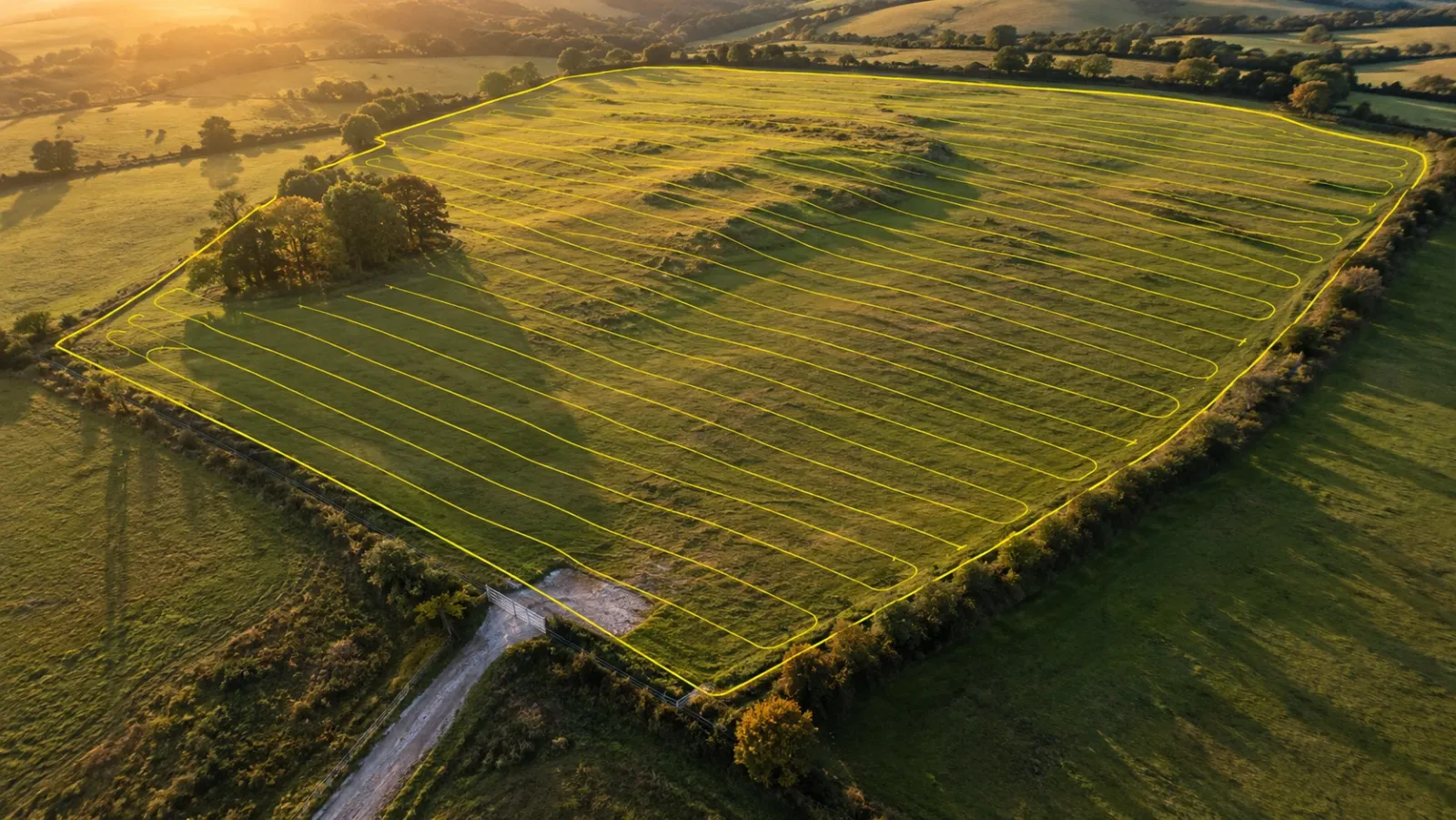
Drone mapping flight planning is the work done before take-off that decides whether a map will be sharp, complete and accurate: where the drone flies, at what height, with how much overlap between photos, and in what conditions. A good plan is written for the deliverable. A plan for a planning-stage orthomosaic is not the same as one for a terrain model used in earthwork payment, even on the same parcel.
This guide walks through the planning decisions in the order a survey team makes them, from the boundary to the battery swap, and ends with a pre-flight checklist you can copy. It is the method behind every capture in YelloSKYE's Survey IQ, and it applies whether your own staff fly the site or a provider does. For how mapping fits into a project more broadly, see our guide to drone mapping in construction.
Start from the deliverable
Every setting in a flight plan trades detail against coverage, overlap against battery time, or height against legal limits. Those trades cannot be settled without knowing what the map is for.
Write down three things before you open a planning app:
- The output. Orthomosaic only, or also a surface model, contours, volumes, a point cloud or a 3D mesh.
- The smallest feature anyone will measure. A kerb line, a crack, a stockpile toe, a manhole cover.
- The accuracy the result must hold. A visual progress record tolerates more error than a cut-and-fill calculation that feeds a payment.
| Deliverable | What the plan must protect | Typical planning emphasis |
|---|---|---|
| Visual progress orthomosaic | Even, complete coverage | Moderate height, standard overlap, repeatable route |
| Topographic surface and contours | Ground visible from many angles | Higher overlap, terrain following, ground control |
| Stockpile or earthwork volumes | Clean edges and toes of each pile | Higher overlap, low sun avoided, a cross-grid on steep piles |
| 3D model of structures | Vertical faces captured | Oblique passes in addition to the vertical grid |
| Corridor along a road or pipeline | Consistent resolution along the line | A few long lines, terrain following, control along the route |
Step 1: Draw the boundary with a margin
The boundary is the polygon the drone will cover. Draw it slightly larger than the area you need, because the outer edge of any map is seen from fewer photos and is the weakest part of the reconstruction. A buffer of one or two flight-line spacings beyond the area of interest keeps the important ground in the well-covered middle.
Also mark on the plan:
- Take-off and landing points with clear sky, firm ground and line of sight to the whole area.
- Obstacles taller than the flight height margin, such as cranes, masts, overhead lines and tall trees on the edge of the site.
- Areas you must not overfly, such as neighbouring properties, roads with traffic or occupied buildings, depending on local rules.
Large or irregular sites are often split into several polygons rather than one, so each block fits a sensible number of batteries and can be re-flown on its own if something goes wrong.
Step 2: Set the height from the resolution you need
Height above the ground controls the ground sample distance (GSD), the patch of ground each pixel covers. Our guide to ground sample distance explains it in depth; for planning, the formula is enough:
GSD = (sensor width × flight height) ÷ (focal length × image width in pixels)
As a worked example, take a camera with a 13.2 mm wide sensor, an 8.8 mm lens and images 5,472 pixels across. At 100 metres above ground, the GSD comes out at about 2.7 cm per pixel. At 60 metres it falls to about 1.6 cm. Halve the height and the detail doubles, but the number of photos roughly quadruples.
Two limits sit on top of the arithmetic. Many countries cap routine drone flights at around 120 metres above ground, so check the local rule. And a feature is only measurable when it spans several pixels, so pick a GSD a few times finer than the smallest item on your list.
Step 3: Choose front and side overlap
Photogrammetry rebuilds the ground by matching the same features in many photos. Overlap controls how many photos each point appears in.
- Front overlap is how much each photo shares with the next one along the same flight line. It is set by how often the camera fires relative to ground speed.
- Side overlap is how much neighbouring flight lines share. It is set by the spacing between lines.
A common starting point for mapping is roughly 75–80% front and 65–75% side. Raise both where the ground gives the software little to match: bare soil, fresh concrete, sand, water, crops and tree canopy all look alike from one frame to the next. Raising side overlap costs more than raising front overlap, because it adds whole flight lines, so increase front overlap first when battery time is tight.
Step 4: Follow the terrain on sloping sites
Most planning apps fly at a fixed height above the take-off point unless told otherwise. On flat ground that is fine. On a slope it is not: over a hill the drone is closer to the ground, so the GSD gets finer and the overlap shrinks; over a valley the opposite happens.
An example shows the size of the effect. A flight planned at 100 metres above a take-off point at the bottom of a 40-metre rise is only 60 metres above the ridge top. The footprint of each photo on the ridge is 40% smaller, so 70% side overlap at the take-off level can drop to around 50% on the ridge. That is often where gaps and soft patches appear in the finished map.
Terrain following solves this by adjusting height along each line to hold a constant distance above the ground, using an elevation model loaded before the flight. Check the elevation model is recent enough: a public model may not show a new cutting or a stockpile, and the drone has no way of knowing. On long, thin sites terrain following matters even more. In YelloSKYE's linear corridor mapping work, flights follow the ground along the corridor swath so resolution stays consistent as the landscape changes.
Step 5: Add oblique passes when you need 3D
A vertical grid photographs the ground well and vertical faces poorly. Walls, retaining structures, building facades, steep cut faces and the sides of tall stockpiles appear in few vertical photos and at steep angles, which leaves them stretched or holed in a 3D model.
Add oblique imagery when the deliverable includes any of these:
- A textured 3D mesh for stakeholders or design review.
- Measurements on vertical surfaces.
- Steep slopes where the vertical grid sees mostly the top edge.
The usual approaches are a second grid flown with the camera tilted, a perpendicular cross-grid, or an orbit around a structure with the camera pointing inwards. Each adds photos, flight time and processing time, so add them to the block that needs them rather than to the whole site.
Step 6: Plan for light, wind and weather
The best flight plan still fails in poor conditions. What to check on the day:
- Sun angle. High sun gives short shadows that change little between the first and last flight line. Low morning or evening sun casts long shadows that move during the flight and hide the ground behind every object.
- Cloud. Even, unbroken cloud is good for mapping because it removes hard shadow. Broken cloud is the worst case, since patches of bright and dull ground confuse matching and leave the mosaic blotchy.
- Wind. Stay inside the aircraft maker's limits, and remember wind at flight height is usually stronger than on the ground. Strong crosswinds also tilt the drone and the camera footprint.
- Wet ground and standing water. Reflections and glare make surfaces hard to reconstruct.
- Shutter speed. The drone should move less than about half a pixel while the shutter is open. At 8 m/s and 1/1000 s it moves 8 mm, comfortably under half of a 2.7 cm pixel. Slow down in dull light rather than accepting blur.
For repeat surveys, fly at a similar time of day each visit. Shadows that sit in different places on each date make change detection harder than it needs to be.
Step 7: Check airspace and permissions
Rules for commercial drone flight differ from country to country, and they change. Pilot certification, aircraft registration, maximum height, distance from people and the need for airspace authorisation are all set by the national aviation authority: the GCAA in the UAE, the CAA in the UK and the FAA in the US are three examples.
Before every mapping flight, confirm:
- The site is not inside controlled or restricted airspace, or that you hold the authorisation it needs.
- No temporary restrictions or notices are active for the date and time.
- The pilot's certification and the aircraft's registration are current.
- The landowner or site owner has agreed to the flight and the take-off point.
- The site team knows when the drone will fly, especially where cranes or plant are working.
On live construction sites, agree the flight window with the site manager in advance: a slewing tower crane is a planning problem, not a judgement call on the day.
Step 8: Plan batteries in blocks
Battery planning turns the flight plan into a working day. Estimate it on paper before going to site.
| Planning input | How to estimate it | Why it matters |
|---|---|---|
| Number of flight lines | Boundary width ÷ line spacing | Sets total distance flown |
| Total distance | Lines × line length, plus turns and transit | Drives flight time |
| Flight time | Total distance ÷ ground speed | Divide by usable battery time |
| Usable battery time | Rated time minus a landing reserve of a quarter to a third | Protects against wind and long returns |
| Spare batteries | One or two more than the estimate | Covers cold, re-flights and gusts |
| Block breaks | Where each battery will run out | Choose them so blocks overlap by at least a line |
Cold shortens battery life, so keep packs warm until use. Swap near the take-off point, and check the app resumes from the last photo taken rather than the start of the line.
Ground control belongs in the plan
Ground control is part of flight planning, not an afterthought on the day. Targets need to be placed and measured before the drone flies, sized for the planned GSD and positioned where the flight will see them clearly. Numbers and layout are a topic of their own, set out in our ground control points guide.
On Survey IQ projects, RTK-GNSS positioning on the aircraft is combined with surveyed targets on the ground; the pairing is what holds YelloSKYE's drone topographic surveys to under 5 cm of error in plan and in height. On land acquisition work, such as our pre-acquisition drone land survey, automated grids across the whole parcel in one mobilisation give the feasibility team boundary, terrain and land-use data far sooner than a ground crew could.
Make the plan repeatable
Most projects need a series of maps, weekly, monthly or on demand, and dates only compare cleanly when each flight is captured the same way. Once a plan has produced a good map, save it and reuse it unchanged: same boundary, height, overlap, take-off point and time of day. Keep the permanent ground control in place and protect it from plant. When the plan has to change, because the site has grown or a structure now blocks a line, record what changed and why, so anyone comparing two dates knows to expect a difference. Inside the DEX platform, each repeat flight lands on the same timeline as the earlier ones, so any inconsistency in the capture shows up directly in the comparison.
Pre-flight checklist for a mapping flight
In the office
- Deliverable, smallest measured feature and accuracy target written down.
- Boundary drawn with a margin, take-off point and obstacles marked.
- Height set from the target GSD and checked against the local height limit.
- Front and side overlap set, raised for uniform ground or vegetation.
- Terrain following on for sloping sites, with a current elevation model.
- Oblique passes added only where 3D or vertical faces are needed.
- Airspace, temporary restrictions, pilot certification and landowner permission confirmed.
- Battery count and block breaks estimated, with spares.
- Ground control and check points planned and, if needed, already measured.
On site
- Wind, cloud and sun angle checked against the plan.
- Firmware, planning app and controller up to date before leaving the office, not on site.
- Propellers, airframe and gimbal inspected; memory cards empty and spare cards packed.
- Camera settings checked, with a shutter speed fast enough for the ground speed.
- Site team briefed on the flight window, cranes and plant clear of the area.
- First few photos reviewed for focus and exposure before the full mission continues.
- Coverage checked before leaving site, so any gap is re-flown the same day.
For the terms used in this checklist, our drone survey glossary gives plain-English definitions.
Frequently asked questions
What height should I fly a drone for mapping?
Work backwards from the ground sample distance your deliverable needs, then use your camera's sensor width, focal length and image width to find the height that gives it. Lower flights show finer detail but need more photos, more lines and more batteries. Stay within the maximum height your national aviation authority allows, which in many countries is around 120 metres above ground.
What overlap should a drone mapping flight use?
Many survey teams start at roughly 75–80% front overlap and 65–75% side overlap for photogrammetry, then raise both for uniform surfaces such as bare soil, crops, water or tree canopy. Overlap is measured at ground level, so on sloping sites it shrinks over high ground unless the flight follows the terrain.
What is the best time of day to fly a mapping mission?
Fly when the sun is high and the light is steady, usually the middle of the day, or under even cloud that softens shadows. Avoid low sun, which casts long shadows that move between flight lines, and broken cloud, which changes the brightness from one photo to the next. Keep repeat surveys at a similar time of day so dates compare cleanly.
How many batteries do I need to map a site?
Estimate total flight time from the number of flight lines, their length and the planned ground speed, then divide by the usable time per battery after keeping a landing reserve of around a quarter to a third. Add spares for cold weather, re-flights and wind. Most planning apps show an estimated duration you can check against.
Do I need permission to fly a drone mapping flight?
Almost always for commercial work, though the rules differ by country. Your national aviation authority, for example the FAA in the US, the CAA in the UK or the GCAA in the UAE, sets pilot certification, registration, height limits and where you need airspace authorisation. You also need the landowner's or site owner's permission to take off and land.