
Key takeaways
- The Question: During the build, what does it take for every site problem to reach the right firm, get fixed and be closed on proof rather than on a promise?
- The Answer: Treat every issue as its own record with a place, evidence, an owner, a due date and a status that only certain people can change. Triage new items daily, review the log by trade weekly, watch the age of open items, and close nothing until the corrected work has been seen.
- The YelloSKYE Angle: With Construct IQ, an issue is pinned on the drone, 360° or fixed-camera capture where it was seen, and the DEX timeline shows that spot before, during and after the fix.
Construction issue tracking is the discipline of logging every problem found while the building goes up, assigning it to the party who must resolve it, and following it until someone has confirmed the fix. It covers defects, clashes between services, damage, missing information and safety findings, and it runs from the first week on site to handover. The aim is simple: no problem should depend on someone's memory to get solved.
Most sites do not lack people who notice problems. They lack a reliable path from noticing to closing. This guide sets out what belongs in an issue log, how to design statuses and ownership, how to run triage and reviews, and which numbers tell you the system is working. It also shows where a visual site record, such as the one YelloSKYE delivers through Construct IQ, makes each step faster and harder to argue with. Closeout snagging has its own guide on the construction punch list; this one is about the months before that.
What counts as an issue, and what does not
Projects generate several kinds of record that look alike but follow different rules. Mixing them in one undifferentiated list is a common reason issue logs become unusable.
| Record type | What triggers it | Usually raised by | Closed by | Typical clock |
|---|---|---|---|---|
| Issue | A problem on site that needs action: defect, clash, damage, missing item | Anyone on the project team | The party who raised it, or a nominated checker | Days to a few weeks |
| RFI | A question the drawings or specification do not answer | Contractor or trade | Design team, with a formal response | Set by contract |
| Non-conformance report | Work that fails a specified requirement | QA/QC team | QA/QC lead after corrective action is verified | Before the work is covered |
| Safety observation | An unsafe act or condition | Anyone, often the safety lead | Safety lead | Immediate to same day |
| Punch item | Incomplete or defective work near completion | Contractor, then owner's team | The inspecting party | Before handover |
An issue can start a chain of other records. A clash found on site may need an RFI to the designer; damage may lead to a back-charge. Link the records rather than copying text between them, so the history stays in one place.
Why issues get lost between site and office
Failures rarely come from a lack of software. They come from a few gaps:
- Double entry. An engineer writes the problem in a notebook or a chat group, then types it into the system later, if at all. Anything that takes longer than a minute to log is often never logged.
- No location. "Leak in the riser" is useless on a building with six risers. Time is lost explaining where the problem is before anyone can explain what it is.
- No clear owner. The issue is sent to "MEP" rather than a named firm and person, so each party assumes another will act.
- Silent hand-offs. The item moves from the field to the office and back without anyone seeing who currently holds it.
- Closure on a message. A trade says the work is done and the item is closed without anyone looking.
A good process closes each of these gaps on purpose.
Anatomy of a useful issue record
Keep the form short enough to complete standing in a corridor, but make the essential fields mandatory.
| Field | Why it matters | Practical rule |
|---|---|---|
| Reference | Lets people refer to one item without ambiguity | Generated automatically, never reused |
| Type | Separates quality, coordination, damage and safety items for reporting | Pick from a short fixed list |
| Location | Removes the "where exactly?" conversation | Pin on the drawing or site capture, plus level and zone |
| Evidence | Shows the condition at the time it was found | At least one photo or a link to a capture position |
| Description | Tells the trade what to do | One problem per record, written for the person fixing it |
| Responsible party | Makes someone accountable | A named firm and contact, not a discipline |
| Due date | Creates urgency that means something | Set before the next activity that would cover or rely on the work |
| Priority | Focuses effort | Two or three levels, defined in writing |
| Cost or programme flag | Alerts the commercial team | Yes or no, with a short note |
| Status history | Shows who did what and when | Every change dated and named |
The due date deserves particular care. A date chosen at random will be ignored. A date set by the programme, for example "before ceiling boards go up on level 4", carries its own reason and is easier to enforce.
Designing statuses and who may change them
The status list is where accountability lives. Keep it short and decide in advance which role is allowed to move an item from one status to the next.
- Logged. Recorded by whoever found it. The site manager or a nominated coordinator checks it within a day and assigns it.
- With trade. The responsible party has been notified. The clock starts here.
- Responsibility queried. The trade disputes that the issue is theirs. This status exists so that disagreements are visible instead of hidden in email.
- Ready to check. The trade reports the work as fixed and attaches a photo from the original viewpoint.
- Closed. Only the person who raised the item, or a nominated checker, can close it, and only after seeing the corrected condition.
- Void. Raised in error or duplicated. Keep the record, mark the reason.
Two rules make this work. First, the trade can never close its own item. Second, an item rejected at "Ready to check" goes back to "With trade" with a note, and the reopen is counted. A high reopen rate is a sign that fixes are being reported before they are finished.
Settling who owns an issue
The "responsibility queried" status will fill up on any busy project. Damage is the classic example: a scratched stair nosing, a dented duct, a chipped worktop. Each trade that worked in the area has a reason to believe someone else caused it.
The fastest way to settle these questions is a dated visual record of the area before and after each trade's work. If a capture from the previous Tuesday shows the nosing intact before the flooring crew moved in, and the next capture shows it damaged, the conversation is short. Without that record, the main contractor often absorbs the cost because nobody can prove otherwise. Our guide to subcontractor management covers how back-charges and disputes are handled once responsibility is clear.
Make logging fast enough that people do it
If logging feels like paperwork, engineers save it for later, and later rarely comes. A few habits help:
- Log at the location, not at the desk. A phone or tablet in the field, with the drawing or site capture open, lets the engineer pin the issue where they are standing.
- Use defaults. Pre-fill the project, level and the engineer's name, and offer the most common issue types first.
- Allow a quick record now and detail later. A photo, a pin and a one-line note in the field can be completed at the end of the day, as long as it is completed the same day.
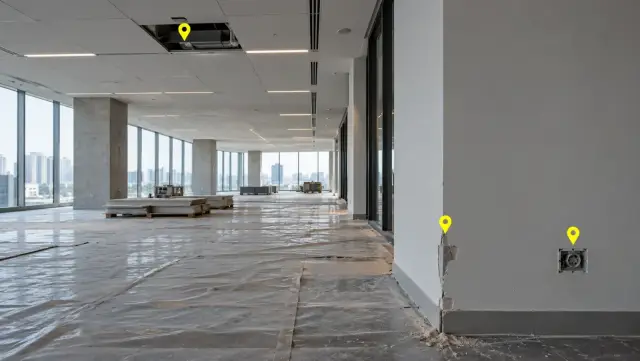
- Raise issues on the existing site record. When interiors are walked regularly with a 360° camera, an issue can be pinned directly on the captured image rather than on a fresh photo, so the evidence and the location arrive together.
Triage and the weekly review
Daily triage
Someone, usually the site manager or a project engineer, should look at every new issue each day. Triage means checking that the location and description are clear, merging duplicates, setting the priority and assigning the responsible party. Fifteen minutes a day prevents a backlog of vague items that nobody wants to own.
Weekly review by trade
At the weekly coordination meeting, filter the log by trade and walk through each firm's open items, oldest first. Ask for a date on anything overdue. Items stuck in "responsibility queried" need a decision from the project manager in the meeting, not another round of email.
Look for patterns
If the same fault appears on several floors, it is a method or briefing problem, not a series of individual defects. Repeated fire-stopping gaps, for example, point to a missing step in the installation sequence. Our guide to construction quality control explains how to feed these patterns back into inspection points.
The numbers that show whether it works
A handful of measures, reviewed weekly, will tell you more than a long report.
| Measure | What it tells you | Warning sign |
|---|---|---|
| Open issues by trade | Where the workload sits | One firm holds a growing share |
| Average age of open issues | How quickly the system moves | Rising week on week |
| Overdue items | Whether due dates are respected | More than a small fraction of the open list |
| Reopen rate | Quality of reported fixes | Items regularly rejected at checking |
| Issues by zone | Where problems cluster | One area far above the rest |
| Time in "responsibility queried" | How fast disputes are settled | Items waiting more than a week |
| Closed without evidence | Discipline of the closing step | Any at all |
The cost of a messy log is real. In the 2018 Construction Disconnected study by FMI and PlanGrid, respondents reported losing about 35% of their time, more than 14 hours in a typical week, to searching for project information, settling conflicts and handling mistakes and rework. A clean issue log reduces all three.
Connecting issue tracking to the rest of the project
One system of record
The field and the office must work from the same list. If issues are logged in one tool and managed in another, the two must sync both ways so that a status change in either place is visible in both. A parallel spreadsheet kept "just in case" is the surest sign the main system is not trusted.
Visual evidence on a timeline
Photos attached to an issue show one moment. A regular site capture shows the whole sequence: the condition when the issue was found, the work in progress and the state after the fix. Construct IQ records issues as geo-referenced annotations placed on the captured image itself, which leaves the responsible trade in no doubt about the spot or the problem. DEX holds every capture on a single timeline, so the person checking a fix can also scroll back and find the first capture in which the fault is visible.
When issues were flagged and followed on 360° captures during an interior fit-out, snags closed five times faster and site coordination time fell by 70%. Some issues start in the structure rather than the finishes; laser scans overlaid on the design model, described in the clash detection use case, reveal those deviations before the services trades arrive. On busy zones, fixed cameras provide a continuous record that helps settle when damage happened.
Links to the tools you already use
Issues raised on YelloSKYE captures do not have to live in a separate inbox. Data can be exported via API or in standard file formats into Procore, Autodesk Construction Cloud or MS Project, next to the schedules, RFIs and documents the team already manages.
Common ways issue tracking breaks down
- Bundled items. One record describing five problems cannot be closed until all five are fixed, so it sits open for weeks.
- Everything marked urgent. If every item is high priority, priority means nothing.
- No closing evidence. Without a photo or capture of the fixed condition, closure is a matter of trust.
- The log stops at the site boundary. Owners and consultants find problems too. Give them a way to raise issues into the same system.
Issue tracking checklist
- Agree the record types (issue, RFI, NCR, safety, punch) and which tool holds each.
- Fix a short list of issue types and two or three priority levels, defined in writing.
- Make location, evidence, responsible party and due date mandatory fields.
- Set due dates against the next covering or dependent activity.
- Decide who may change each status, and never let a trade close its own item.
- Triage new issues daily and review the log by trade weekly, oldest first.
- Track open count, average age, overdue items and reopen rate every week.
- Keep a regular dated visual record of each zone so responsibility questions can be settled quickly.
- Close each item only after someone has seen the repaired condition, in person or in a capture.