Construction Robotics: What Robots Actually Do on Site Today
By Kush Agarwal, President and CEO, YelloSKYE. Published .
Executive Summary
- The Question: Which jobs are robots actually doing on construction sites today, and when is one worth bringing onto a project?
- The Answer: Robots on real sites are specialists. They mark out layouts, carry cameras and scanners along fixed routes, drill overhead, lay blocks, tie rebar, demolish and inspect. They pay off on large, repetitive, well-modelled work, and they still need people to set up, supervise and check what they produce.
- The YelloSKYE Angle: A robot that captures site conditions is one more way of collecting reality capture data. Construct IQ brings drone, 360°, fixed-camera and laser scan data together in the DEX platform, and the same questions of alignment, comparison and review apply whoever carries the sensor.
Construction robotics is the use of machines that carry out site tasks with partial or full autonomy: printing layout on slabs, recording progress along a set route, drilling ceilings, laying masonry, tying reinforcement, demolishing structures and inspecting from the air. On real projects these robots are narrow specialists, each doing one job within a trade, and none of them runs a site on its own.
This guide is for project managers, owners and contractors weighing whether a robot belongs on their next project. It sets out the main categories in use today, where each one earns its place, where it struggles, and how the data robots collect fits into the wider reality capture record that teams already keep. YelloSKYE works on that record through Construct IQ, our construction monitoring solution.
What counts as a construction robot
The term covers a wide range, and vendors stretch it in both directions. A useful working definition is a machine that senses its surroundings and carries out a physical or data-gathering task with little or no continuous human control. That separates robots from ordinary power tools and from remote-controlled plant, even though the line is blurred in practice.
It also helps to sort robots by what they produce:
- Robots that build. They change the physical work: printing layout, drilling, laying blocks, tying bars, finishing concrete.
- Robots that record. They move a camera, scanner or other sensor through the site and return data: progress walks, scans, inspections.
- Robots that remove. Remote and semi-autonomous demolition machines take away material where it is too dangerous for crews.
The first group changes how a trade works. The second changes how a project knows what has been built. They have different buyers, different payback and different risks.
The jobs robots are doing now
| Task | What the robot does | Where it pays off | Main limits |
|---|---|---|---|
| Layout marking | Drives across a slab printing wall lines, openings and fixing points from the model | Large, repetitive floor plates; fit-out with many partitions | Needs a clean, dry slab and an up-to-date model; slow around clutter |
| Site scanning and 360° capture | Follows a saved route carrying a camera or laser scanner, capturing at fixed points | Large buildings with frequent capture needs; overnight or out-of-hours walks | Stairs, doors, debris and changing layouts interrupt routes |
| Overhead drilling | Positions itself under the ceiling and drills holes for anchors and hangers | Services installation across large open areas | Needs clear floor and access; struggles with congested ceilings |
| Bricklaying and blocklaying | Lifts and places units with mortar or adhesive, with a crew feeding and finishing | Long, straight walls with consistent units | Corners, openings and short runs still need masons |
| Rebar tying | Travels over a mat of reinforcement tying intersections | Bridge decks and large flat slabs | Little use on walls, columns or congested cages |
| Demolition | Remote or semi-autonomous machine breaks concrete and masonry | Hazardous interiors, confined spaces, contaminated structures | Operator still in control; transport and set-up effort |
| Aerial inspection and mapping | Drones fly saved routes to capture maps, models and close imagery | Earthworks, roofs, facades, large and linear sites | Weather and flying regulations; interior coverage needs other tools |
Layout marking
Setting out is precise, repetitive and easy to get wrong by a few centimetres, which makes it a natural fit. A layout robot reads the coordinated model or drawings and prints positions on the slab, usually guided by a total station that tracks it continuously. The benefit is not only speed: lines come straight from the current design, so errors from misread drawings drop. The risk moves upstream. If the model is out of date, the robot prints the wrong wall perfectly.
Robots that capture site conditions
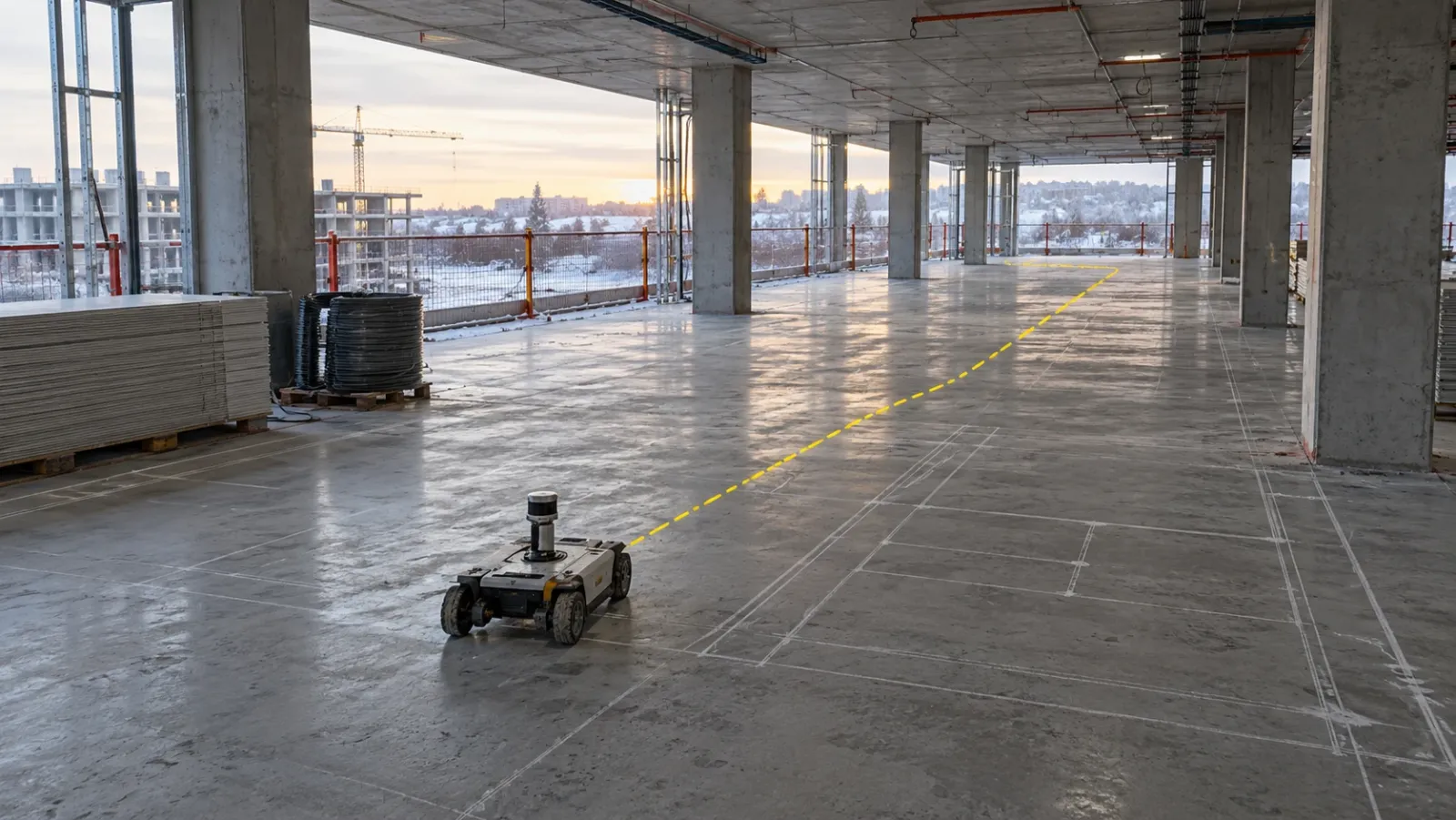
This is the most widespread category after drones. Wheeled or four-legged robots carry a 360° camera or laser scanner along a route, stopping at the same points on each walk. Their strength is repeatability: the same views, at the same positions, on a fixed schedule, often overnight when the floors are quiet. That makes week-to-week comparison more reliable than captures from people who walk slightly different routes each time.
Their weakness is the site itself. Floors change daily, doors are closed, materials appear in corridors and stair access may be blocked. Most deployments still need someone to clear the route, step in when the robot stops, and check that each capture is complete.
Drilling, masonry and rebar
These robots take on tasks that are both repetitive and hard on the body: drilling hundreds of overhead holes, lifting heavy blocks for hours, bending over to tie thousands of bar intersections. They work best where the geometry is regular and the area is large. They work alongside a crew rather than replacing it: people supply materials, handle edges and details, and check quality.
Demolition and hazardous work
Remote-controlled demolition machines have been in use longer than most construction robots. They keep operators away from falling material, dust and contaminated surfaces. Their autonomy is limited; the gain is distance from the hazard, not removal of the operator.
Inspection from the air
Drones are the most common robots on construction sites, even if few people call them that. Flown on pre-programmed routes, they capture the whole site the same way each time. Docked drones go further and launch on a schedule from a base on site; our guide to drone-in-a-box explains when that makes sense and how flying regulations affect it.
Where robots pay off
Robots tend to justify themselves when several conditions line up:
- Volume. Many identical floors, long walls, large slabs or a site that must be recorded every day.
- Regular geometry. Open floor plates and repeating layouts rather than one-off details.
- A reliable digital model. Layout and drilling robots are only as good as the coordinated model they work from.
- A hazard to remove. Work at height, heavy lifting, dust or unstable structures.
- Scarce labour. Where skilled trades are hard to find, a robot that takes over the repetitive part lets the crew cover more ground.
- Someone who owns it. A named person who plans routes, deals with faults and makes sure the output is used.
Without the last point, robots tend to be trialled, admired and parked.
The limits worth planning for
A site is not a factory. Floors are uneven, layouts change, weather intrudes and dozens of trades share space. Plan for these constraints before committing:
- Set-up and supervision. Mapping routes, calibrating positioning and training staff all take time, and most robots still need someone nearby.
- Site readiness. Clean slabs, clear corridors, charging points and connectivity are not always available on a live project.
- Interfaces with other trades. Exclusion zones, deliveries and other crews working in the same area all affect productivity.
- Safety and standards. Machinery safety requirements differ by country, and site safety plans need updating to cover autonomous machines.
- Unclear payback. Published productivity claims usually come from favourable conditions. Run a measured pilot on your own work before scaling.
How robot-captured data fits a reality capture workflow
A robot that carries a camera or scanner does not create a new kind of data. It produces 360° images and point clouds, the same outputs a person with a camera or a scanner on a tripod would. What changes is how often and how consistently they are captured. The reality capture guide covers the methods in full; the question here is where a robot fits among them.
| Capture approach | Who operates it | Consistency between captures | Best suited to |
|---|---|---|---|
| Handheld 360° walk | Any site team member | Good if the route is agreed | Regular interior progress on most projects |
| Robot-carried 360° or scanner | Robot on a saved route, with a supervisor | High: same points each time | Very large buildings with frequent capture needs |
| Tripod laser scanner | Trained scanning technician | High at each station | Precise as-built checks against the design model |
| Fixed cameras | Mounted and left running | Identical view every time | Continuous watch over chosen zones |
| Drone | Pilot or scheduled mission | High on pre-programmed routes | Site-wide exterior, earthworks, roofs and facades |
Whichever approach captures the data, the same steps follow. Captures must be placed on the floor plan or tied to project coordinates, checked against last week's capture and the design model, and reviewed by someone who can act on what they see. A robot that captures every night but feeds a folder nobody opens adds cost without value.
It is also worth asking whether a robot is needed at all. In YelloSKYE's interior fit-out use case, site team members captured floors with a 360° camera without specialist technicians, and navigable 360° records cut coordination time by 70%. For many projects, a well-run walk with a handheld camera delivers most of the consistency a robot would, at far lower set-up effort. Robots earn their place where the building is so large, or capture so frequent, that walking it becomes a job in itself.
For precise checks, scan quality matters more than how the scanner moved. In our as-built vs BIM clash detection use case, the structure is scanned and the point cloud overlaid on the design model to find deviations before the next phase starts. Laser scanning in construction explains how terrestrial, mobile and aerial scanning differ in accuracy, which is the key question for any robot-mounted scanner.
Where YelloSKYE fits
YelloSKYE's role is the record that capture produces. Construct IQ combines drones on pre-programmed routes, 360° interior capture, fixed cameras and, through BIM IQ, laser scanning. The DEX platform keeps every capture dated and located, lets teams step back through site history, compare two dates, overlay CAD and BIM, and measure distance, area and volume from a desk. BIM IQ accepts point clouds from the major scanner brands in formats including .e57 and .las, and turns them into as-built models checked against design.
On the exterior, scheduled drone capture already does much of what people hope robots will do. Our aerial progress capture use case records over 15 hours saved each week per site manager once scheduled flights took the place of walking the site and compiling photo reports.
Questions to ask before trialling a robot
- Which specific task will it take over, and how is that task done and measured today?
- Is the digital model or drawing set it depends on accurate and kept current?
- Who will set it up, supervise it and deal with faults on site?
- What site conditions does it need (clear floors, power, connectivity, lighting), and can you guarantee them?
- Where will its output go, who reviews it, and how does it join the rest of the project record?
- How will you measure the result against a comparable area done without the robot?
- What does the safety plan need to say about autonomous machines working near crews?
Start with one task, one area and a clear measure. Robots that prove themselves on a pilot are worth scaling; the rest are worth returning.
Frequently asked questions
What are construction robots used for today?
Most robots on construction sites do one narrow, repetitive job: printing layout lines on slabs, carrying cameras or scanners along a fixed route to record progress, drilling holes in ceilings, laying blocks, tying rebar, demolishing by remote control or inspecting from the air. General-purpose robots that can move between trades do not yet exist on real sites.
Will robots replace construction workers?
Not in any near-term sense. Today's robots take over specific tasks within a trade, usually the most repetitive or physically punishing ones, and they need people to set them up, supply them, supervise them and finish the work around them. The more realistic effect is that crews spend less time on those tasks and more on work that needs judgement.
How much does a construction robot cost?
It varies widely by type, from rental of a layout or scanning robot for a single project to a large capital purchase for a bricklaying or demolition machine. Many suppliers offer the robot as a service, charging per project, per day or per area covered. The full cost should include set-up, training, site preparation, supervision and the digital model the robot works from.
What is a layout robot?
A layout robot is a small mobile machine that drives across a floor slab and prints the positions of walls, openings, sleeves and fixings directly from the digital drawings or model. It replaces chalk lines and tape measures for setting out, and it depends on a total station or similar positioning system to know where it is.
Can robots scan a construction site on their own?
Yes, within limits. Wheeled and legged robots can follow a saved route through a building, stopping to capture 360° images or laser scans at the same points each time. They still need clear paths, help with closed doors and obstacles, and someone to check that the capture is complete and correctly aligned before it is used.