AI in Construction: Where It Helps Today and Where It Falls Short
By Kush Agarwal, President and CEO, YelloSKYE. Published .
Executive Summary
- The Question: Which construction tasks does AI genuinely help with today, and which claims should a project team treat with caution?
- The Answer: AI earns its place where a task involves large amounts of repetitive reading, counting, sorting or comparing: documents, take-off, schedule checks, site imagery and some defect and hazard flags. It is weak wherever the job needs accountability, an explanation of cause, or data the project never recorded.
- The YelloSKYE Angle: We apply AI to one narrow job: turning drone, 360° and fixed-camera captures into aligned, measurable site records in DEX, with engineers reviewing what the software flags before anyone acts on it.
AI in construction means software that learns from examples instead of following hand-written rules, applied to the text, drawings, schedules, images and sensor readings a project produces. Today it is good at narrow, high-volume chores: searching and summarising documents, suggesting quantities from drawings, checking a programme for broken logic, organising and comparing site photographs, and spotting a limited range of visible defects and hazards. It cannot yet run a project, decide who is at fault or certify that work is acceptable. At YelloSKYE we use it for one slice of this picture, site imagery, through Construct IQ, our construction monitoring solution.
The sections that follow take the main areas of construction work one at a time and give a plain verdict on each, then look at why construction data is hard for AI, what to ask a vendor and how to start.
Four kinds of AI you will meet on a project
Vendor material uses "AI" as a single label, but it covers quite different technologies. Knowing which one sits behind a product tells you most of what you need to know about its strengths and its blind spots.
| Type | What it works on | What it does well | Typical construction use |
|---|---|---|---|
| Language models | Contracts, specifications, RFIs, minutes, correspondence | Summarising, drafting, finding clauses, answering questions across a document set | Tender review, specification queries, first drafts of letters and reports |
| Computer vision | Photographs, video, 360° imagery, drone maps, point clouds | Recognising objects and conditions, placing images in space, detecting change between dates | Site records, progress comparison, defect and anomaly flags |
| Predictive models | Historic cost, programme and equipment data | Estimating likely outcomes from patterns in past records | Cost and duration risk, maintenance forecasting |
| Optimisation and generative design | Rules, constraints and goals set by designers or planners | Testing many layout or sequence options quickly | Early massing, site logistics layouts, resequencing studies |
Many products combine two or more of these, for example computer vision to read imagery and a predictive model to project a finish date. Ask which part does what, because each has its own reliability.
A task-by-task verdict
The table summarises the six areas teams ask about most; the sections after it explain the reasoning.
| Task | Where AI helps now | Where it struggles | Verdict |
|---|---|---|---|
| Scheduling and planning | Checking logic, flagging open ends and odd durations, comparing programme versions | Constraints nobody wrote down; forecasts from thin history | A useful checker, not a planner |
| Estimating and take-off | Counting and measuring items on drawings, matching to past rates | Incomplete drawings, unusual specifications, live market prices | Speeds up an estimator; does not replace one |
| Documents and contracts | Search, summary, clause comparison, first drafts | Legal interpretation; confident answers that are wrong | Valuable with review |
| Site imagery and progress | Placing images on the site, comparing dates, measuring, flagging deviation from design | Hidden work, cluttered scenes, judging workmanship | Established where capture is consistent |
| Safety | Flagging a few visible conditions on camera feeds | Behaviour, context, near misses, privacy | Early and narrow |
| Quality and defects | Flagging visible anomalies and deviations from the model for triage | Tests, workmanship, anything behind finishes | Good for deciding where to look |
Scheduling and planning
A programme with several thousand activities is exactly the kind of thing software checks better than a tired planner: activities with no successor, durations far outside the norm for that trade, float that disappears between revisions, or two versions that differ in ways nobody flagged. Tools that do this are mature and save real time.
Forecasting is another matter. A model that predicts finish dates needs a large history of comparable projects, recorded consistently, and most contractors do not have one. It also cannot see the things that actually drive a delay on a given site: a crane that is shared between two blocks, a design package that is late, a subcontractor who is overstretched. Treat schedule predictions as a prompt for a conversation, not as a forecast you report to an owner.
Estimating and quantity take-off
Automated take-off from drawings and models is one of the more practical uses. Counting doors, measuring wall lengths or extracting areas from a clean model is tedious, and software does it quickly. Matching those quantities to rates from past jobs is also helpful as a first pass.
The limits are the drawings themselves and the market. Early-stage drawings are incomplete, specifications vary, and prices move with supply. An estimator still needs to decide what is missing, what the risk allowance should be and whether the number is one the business is willing to stand behind.
Documents, contracts and correspondence
Language models are good at finding things in large document sets: which clause covers liquidated damages, what the specification says about a particular finish, which RFIs mention a given grid line. They also produce reasonable first drafts of routine letters and meeting notes.
The risk is fluency. A model can give a well-written answer that is simply wrong, or that misses an amendment buried in another file. Anything with contractual or legal weight needs a qualified person to read the source, not just the summary.
Site imagery and progress
This is where computer vision is furthest along, because the input is plentiful and the questions are concrete: where was this taken, what has changed since last week, does it match the model, how much material has moved. Software can place captures on the site, line them up with drawings and the programme, measure from them and mark where they differ from the plan. The output still needs a reviewer, and it says nothing about work that is out of sight.
We cover this area in depth in our guide to visual intelligence in construction, and compare software-assisted and manual checking in AI vs manual progress verification.
Safety
Camera-based systems can be trained to flag some visible conditions, such as a person without a hard hat or a vehicle in a pedestrian zone. These can help a busy supervisor notice things, but they see only what is in frame, they misread unusual scenes and they generate alerts that someone has to triage. They cannot judge intent, fatigue or whether a temporary works design is adequate.
Cameras on site also raise privacy and workforce-relations questions that need to be settled before the first one goes up. Our construction safety statistics guide looks at what visual monitoring can and cannot contribute to safety.
Quality and defects
Vision models can flag visible anomalies across very large areas: hot spots on a thermal map, cracking or staining on a facade, an element that sits away from its modelled position. That is valuable for triage, because it tells an engineer where to look first. It is not inspection. Pressure tests, fixings, concealed joints and workmanship all need a person, and a clean image is not proof that work meets the specification.
Where AI does not help yet
Some claims in the market run well ahead of what products do on real sites. These are the areas to be most careful with.
- Deciding who pays. AI can supply evidence for a payment claim or a dispute. It cannot carry responsibility for the decision, and no contract recognises it as a party.
- Explaining why. A record can show that a zone stopped moving for three weeks. Whether that was design, labour, access or materials is still found out by asking people.
- Projects without precedent. Models learn from history. A first-of-a-kind structure, a new building type for the firm or an unusual procurement route gives them little to work with.
- Work nobody can see. Imagery cannot look inside a wall, under a slab or into a duct. If it was not captured before it was covered, no model will recover it.
- Acting on its own. Systems that take actions without approval, sometimes called agents, are at an early stage. On a construction project, where a wrong instruction has a cost and sometimes a safety consequence, treat them as assistants that draft and suggest.
- Repairing a weak process. If capture is irregular, files are named at random and nobody owns the review, adding AI makes the confusion faster rather than smaller.
Why construction is a hard place for AI
Construction has not been short of reasons to adopt better tools. The McKinsey Global Institute's 2017 study Reinventing Construction put the sector's annual labour-productivity growth over two decades at around 1 per cent, compared with 2.8 per cent across the world economy. But several features of the industry make AI harder to apply than in, say, retail or manufacturing.
| Feature of construction | What it means for AI |
|---|---|
| Every project is different | Training data from one site transfers imperfectly to the next |
| Data is split across many firms | Owners, designers, contractors and suppliers each hold part of the record, in different tools |
| Records are inconsistent | Activity names, drawing numbers and photo folders follow no shared convention |
| The site changes daily | Lighting, weather, clutter and temporary works make images harder to interpret |
| Errors are expensive | A wrong answer can mean over-payment, rework or an unsafe condition, so outputs need checking |
None of these is a reason to wait. They explain why today's useful products are narrow ones that work on one well-defined type of data and keep a person in the loop.
How YelloSKYE uses AI, and what it leaves to people
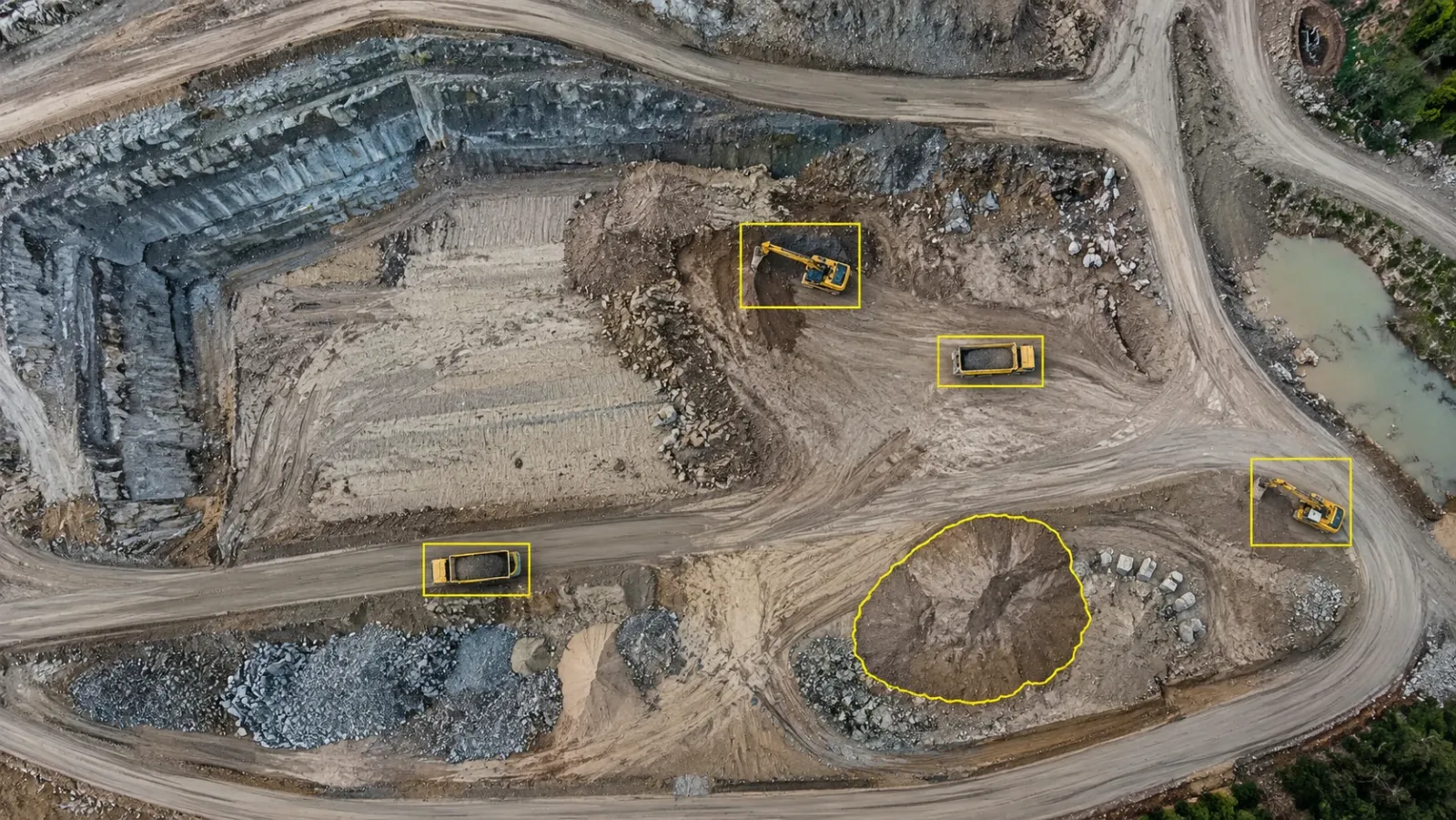
Our use of AI is limited to site imagery and the measurements that come from it. Inside DEX, our platform, the processing lines up drone, 360° and fixed-camera captures with your CAD and BIM models, marks where the site departs from them, works out volumes and keeps the progress dashboard current. Construct IQ compares what has been built against the schedule baseline in 4D, and can send a notification when a key milestone is hit or when activity stops in an area flagged as high priority.
Three use cases on our site show the range:
- Earthworks. In the earthwork volumetric analytics use case, DEX compared each new terrain model with the design grading plan and showed cut and fill as a heat map, and a survey cycle that used to take two weeks came down to a few hours.
- Interiors. For fit-out, the interior fit-out use case has a site team member walk the floor with a 360° camera while the software reconstructs the walk into a navigable record, with each image placed at its location so dates can be compared side by side.
- Assets. In the solar farm thermal inspection use case, Inspect IQ processes the thermal imagery and flags anomalies such as hot spots, diode failures and string disconnections, each tied to a GPS position.
What we do not do matters as much. DEX does not produce estimates, write programmes or interpret contracts; those belong in the tools your team already uses, and progress data can be exported to Procore and Autodesk Construction Cloud. Civil and geospatial engineers on our team check what the automated processing produces, because a flag that has not been checked is a question, not a finding.
Questions to ask before you buy an AI tool
| Question | Why it matters |
|---|---|
| What exactly does the model do, and what does a person still do? | Vague answers usually mean the human share is larger than the brochure suggests |
| What data does it need from us, how often and in what format? | The cost of feeding the tool is often higher than its licence |
| How was accuracy measured, and on what kind of project? | A figure from a clean test set may not hold on your sites |
| How are errors shown to the user? | A good tool makes uncertainty visible instead of hiding it in a confident score |
| Does it fit our existing tools? | Outputs that have to be retyped into another system will stop being used |
| Who owns the data and the outputs? | Check whether your project data is used to train models for other customers |
A practical starting checklist
- Pick one recurring problem with a cost attached. Slow progress reporting, disputed volumes and document searches that take hours are good candidates.
- Check you already capture the data it needs. If not, fix the capture routine first; that alone often delivers much of the benefit.
- Name a reviewer. Decide who checks the output and what they do when it is wrong.
- Run it on a live project, not a demo. Compare the result with how the work is done today, on the same task and the same weeks.
- Measure time and decisions, not features. Track hours saved, faster approvals or fewer site visits, and drop the tool if those do not move.
- Expand only from something that works. Move to the next task once the first one is part of the routine and trusted by the people who use it.
Frequently asked questions
How is AI used in construction today?
Most practical uses are narrow and repetitive: searching and summarising project documents, suggesting quantities from drawings, checking schedules for logic errors, organising and comparing site imagery, and flagging certain visible defects or hazards. In each case the software prepares or checks work, and a person still decides what to do with the result.
Will AI replace project managers or site engineers?
Not on any realistic timescale. AI can take over parts of the reading, counting and comparing that fill a project manager's week, but it cannot carry responsibility for a decision, negotiate with a contractor or judge whether work is acceptable. The likelier change is that the same team handles more information with less manual effort.
What are the main limitations of AI in construction?
AI cannot see work hidden behind finishes, explain why a zone fell behind, or certify quality. It also depends heavily on data: each project is different, records are spread across many companies, and a model trained on one type of building may perform poorly on another. Outputs need review before anyone acts on them.
Is AI in construction only worth it for large contractors?
No, but the case is different. Smaller firms usually get more from AI built into tools they already pay for, such as document search or automated processing of drone and camera captures, than from bespoke models. The deciding factor is whether the firm already records the data the tool needs.
What should we have in place before adopting an AI tool?
A clear problem that costs you time or money, a consistent way of capturing the data that problem depends on, and a named person who reviews the output. Without those three, even a capable tool produces results nobody trusts or uses.