Pre-Drywall Inspection: What to Check and Record Before Walls and Ceilings Close
By Kush Agarwal, President and CEO, YelloSKYE. Published .
Executive Summary
- The Question: What should you check inside open walls and above ceilings before they are boarded, and how do you record it so the evidence is still useful years later?
- The Answer: Inspect every service and fixing in the zone against the coordinated drawings, then capture it on a repeatable route with measurements from fixed references, and file each capture against the room, the drawing sheet and the system it shows.
- The YelloSKYE Angle: Construct IQ uses 360° walkthroughs to record interiors at each close-up, and DEX keeps those records on one timeline next to the design model.
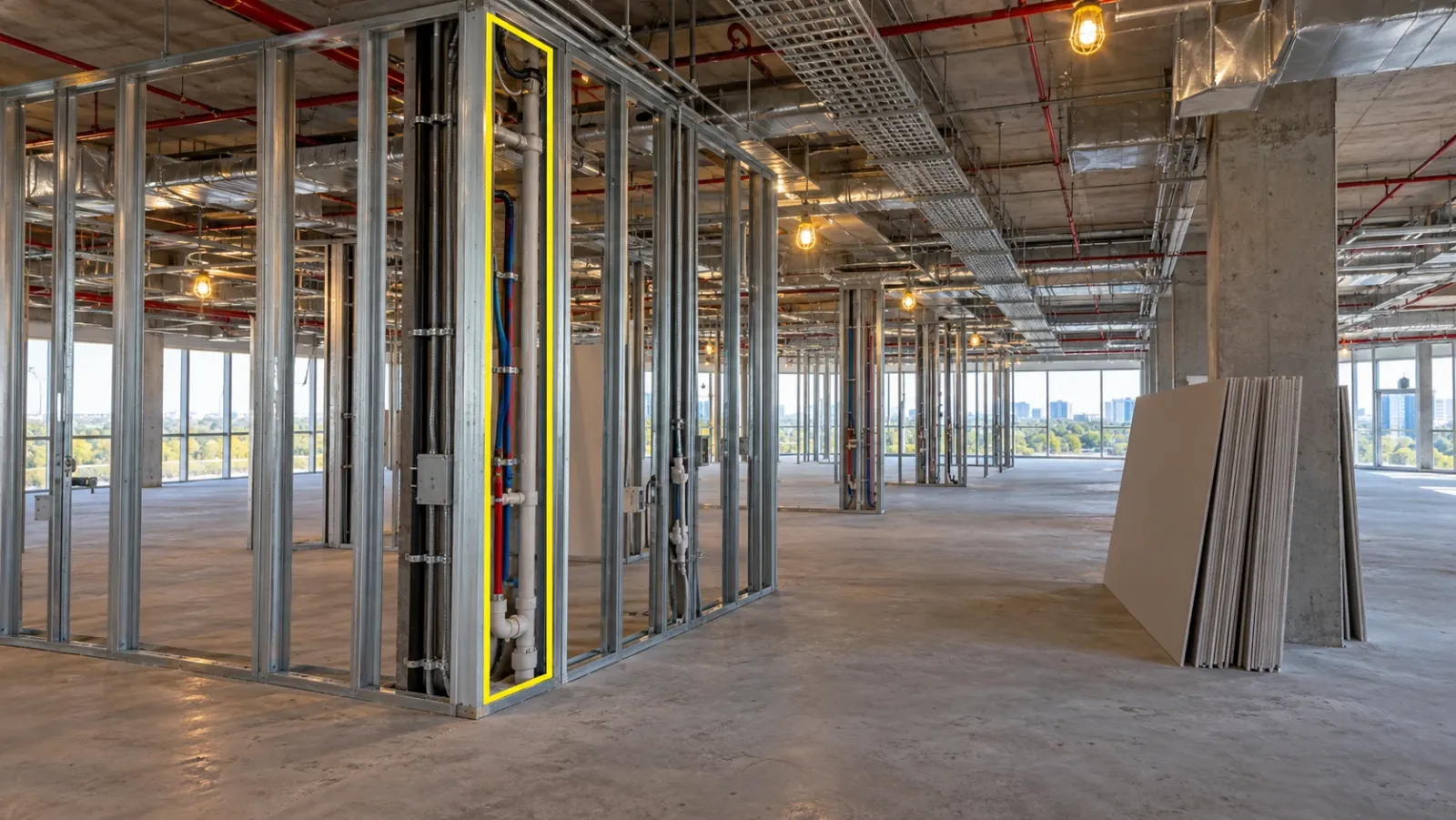
A pre-drywall inspection is the last chance to see the services, fixings and fire protection inside a wall or above a ceiling before boards and tiles hide them. You check the work against the drawings, fix what is wrong while access is free, and keep a dated, located record of what was built. Done well, the inspection protects the build schedule now and gives the owner a picture of hidden work they can use for decades.
This guide covers what to check in walls and ceiling voids, a capture sequence that produces a record people can rely on, how to link that record to drawings, and where it pays back after handover. It sits alongside our pre-pour inspection checklist, which deals with the same problem one stage earlier, and it reflects how we approach interior capture in Construct IQ.
What the inspection covers
The phrase comes from residential building, where the drywall crew is the trade that seals everything in. On commercial and industrial projects the same check goes by other names: close-in, cover-up, above-ceiling or pre-board inspection. The scope is identical. Anything that will sit between two faces of board, or between a slab soffit and a suspended ceiling, is inspected and recorded while it can still be reached by hand.
Two separate things happen at this point:
- Verification. Is the work complete, in the right place and to specification? This is the quality judgement, made by a competent person against the drawings and the inspection and test plan.
- Recording. Is there a dated, located image of every element that will be hidden? This is the evidence, and it outlives the inspection by many years.
Teams often do the first and skip the second, or take a handful of photos that nobody can place later. Both are needed. Where an authority or third-party inspection is also required before covering, it usually checks compliance only; the project's own record still has to be made.
What to check inside open walls
Walk each wall run with the drawings for every trade that has work in it. The table below lists what typically sits in a partition or lining and what to confirm before the boards go on.
| Element | What to confirm | What to record |
|---|---|---|
| Framing | Stud size and spacing, head and base fixings, deflection heads where the slab will move | Wide view of the run, close-up of head detail |
| Blocking and backing | Timber or steel pattresses for wall-hung basins, handrails, screens, shelving and grab rails, at the right heights | Each pattress with a tape showing height above finished floor |
| Electrical | Back box positions and heights, cable routes and support, segregation from data and from pipes | Each box, and the route between boxes |
| Data and security | Cable containment, door contacts, reader and camera cable tails, spare draw wires | Tails at each device location, labels legible |
| Plumbing and drainage | Pipe routes, joints, supports, isolation valves, test passed and tagged | Each valve and joint, the test tag |
| Heating and cooling pipework | Insulation complete, valves accessible, vents and drains where specified | Valves and any branch connections |
| Fire stopping | Penetrations through fire-rated walls sealed with the approved system and labelled | Every penetration, both faces if open |
| Acoustic and thermal insulation | Full fill, no gaps at services, correct product | Wide view showing coverage |
| Structural items | Bracing, ties and anchors that will be concealed | Each item with its gridline reference |
Blocking deserves special mention. It costs almost nothing to install now and a great deal to retrofit, and it is the item most often missing when a fixture arrives months later. Check it against the fixture schedule, not just the framing drawing.
What to check above the ceiling
Ceiling voids are more crowded than walls, and they matter more to the people who will run the building. Before the grid is tiled or the plasterboard ceiling closed, confirm:
- Access. Valves, dampers, filters, actuators and junction boxes that need maintenance sit under a planned access panel or demountable tile, not above fixed board.
- Clearances. Ductwork, pipework and cable trays leave room for the ceiling grid, light fittings and sprinkler heads at their design heights.
- Supports. Hangers and brackets are the specified type and spacing, and services are not resting on each other or on the ceiling grid.
- Fire and smoke dampers. Installed in the right walls, with access for testing and reset.
- Sprinkler drops. Positioned to suit the reflected ceiling plan, so they line up with the tile layout.
- Labels and flow arrows. Pipe and duct identification applied and readable, because a photo of an unlabelled pipe tells a future engineer very little.
- Tests. Pressure and leakage tests on pipework and ductwork in the zone passed and recorded before anything is enclosed.
For tight voids or where services run against a coordinated model, a laser scan of the void gives a measurable record that can be checked against the design. Our as-built versus BIM clash detection work uses terrestrial scans overlaid on Revit or Navisworks models to find deviations before follow-on trades build over them.
A capture sequence that holds up
The record is only useful if someone can find the right image and trust where and when it was taken. A fixed sequence makes that happen without relying on any one person's habits.
1. Plan close-up dates from the programme
Use the two- to three-week look-ahead to list every zone that will be boarded or ceilinged in the coming period. Each one gets an inspection date the day before boarding starts, and the boarding trade does not enter that zone until the inspection is released.
2. Trades finish and self-check first
Ask each trade to confirm its work in the zone is complete and its tests are passed before the joint inspection. An inspection that finds half the services still being installed wastes everyone's time and produces a record of an unfinished state.
3. Walk a fixed 360° route
Walk the zone with a 360° camera along the same route each time, room by room, in a set direction. A 360° frame records the whole space around the camera, so walls on both sides and the ceiling void are captured in one pass. On our interior fit-out projects, the walkthrough is turned into a navigable record where every image sits at its location on the floor plan, and it can be operated by any site worker without a specialist.
4. Add close-ups where detail matters
Some items need a sharper image than a 360° frame gives: valve tags, fire stopping labels, small fixings. Photograph these with a phone or camera, taking the wider shot first so the close-up can be placed.
5. Measure from things that will still be there
A photo shows that a pipe exists; a dimension tells someone where to cut. For key items, include a tape in the frame measured from something permanent: the finished floor level, a gridline, a column face or a door opening. Studs and pipes disappear; columns and floors do not.
6. Release, then close
The inspector records the result for each zone, any defects are fixed and re-captured, and only then is the zone released for boarding. If boarding happens over a weekend before the release, the record has a gap that cannot be filled.
Linking the record to the drawings
A folder of images sorted by date answers only one question: what did the site look like that day? To answer the questions people actually ask later, each capture needs a few links.
| Link | Why it matters | How to make it |
|---|---|---|
| Room or zone number | Lets someone pull up one room without browsing the whole floor | Capture on a plan-based tool, or name files by room |
| Drawing sheet and revision | Shows what the work was checked against | Note the revision on the inspection record |
| System | Lets a mechanical engineer see only the ductwork, or an electrician only the containment | Tag captures by service where your tool allows it |
| Inspection result | Connects the image to the decision and the person who made it | Attach the capture to the signed inspection record |
| Requests for information and changes | Explains why the work differs from the original drawing | Reference the RFI or change number on the affected capture |
Comparing the capture with the design is easier when both sit side by side. In DEX, the split view places design models next to the captured interior, and the time view moves between capture dates, so a reviewer can see the same wall before and after boarding. The construction photo documentation guide covers file naming and storage for images that sit outside a platform.
How the record saves money later
The cost of a missing pre-drywall record rarely shows up during construction. It appears when someone has to work on the building and does not know what is behind the surface. These are the situations where the record pays for itself.
| Situation after close-up | Without a record | With a record |
|---|---|---|
| A defect found during commissioning | Open several sections of ceiling to trace a route | Open one panel where the image shows the fault |
| A tenant fixes a heavy screen to a partition | Guess where blocking is, or cut exploratory holes | Read the pattress position and height from the image |
| A leak appears in a finished ceiling | Remove tiles across a wide area to find the joint | Go straight to the joints in that run |
| A fire stopping audit before occupation | Open walls to prove penetrations were sealed | Show each sealed penetration with its label |
| A refit adds data points or power | Survey walls with detectors and trial holes | Plan routes from the recorded containment |
| A dispute about installed work | Rely on memory and the subcontractor's word | Show the dated image of the work as installed |
For owners, the record becomes part of the handover package. In our warehouse handover documentation use case, drones and 360° cameras logged MEP placements before they were enclosed, and the operator received role-based access to that history in DEX. Maintenance teams use those layers to find utilities hidden behind concrete, and the project recorded no post-handover documentation disputes and a 70 per cent reduction in physical pre-delivery inspection hours. Our handover documentation guide covers how to package records like these for the owner.
Common reasons the record fails
- Close-up happens before the inspection. Boarding crews are paid by area and move fast. Without a written hold, they will start on open zones.
- Images with no location. Hundreds of close-ups of ductwork, none of which can be placed on a plan.
- Only the problem areas are photographed. A defect log is useful, but the owner also needs the parts that were right, because those are the parts they will later work on.
- Ceilings forgotten. Teams record walls carefully and close ceilings over a weekend with no capture.
- The record stays with the contractor. Images on a site phone or a subcontractor's account are lost at demobilisation.
- One-off effort. The first floor is recorded perfectly and the last floor not at all, because the routine depended on one enthusiastic engineer.
Pre-drywall inspection checklist
Use this for each zone before releasing it for boarding or ceiling close-up:
- Every trade in the zone has confirmed completion and passed its tests.
- Framing, deflection heads and bracing are checked against the drawings.
- Blocking and backing match the fixture schedule, with heights recorded.
- Electrical, data and security positions match the current layout drawings.
- Pipework joints, valves and supports are checked and the test tag is visible.
- Every penetration through a fire-rated element is sealed and labelled.
- Insulation is complete with no gaps around services.
- Above-ceiling items that need maintenance sit under a planned access point.
- Services clear the ceiling grid, fittings and sprinkler heads.
- A 360° walk of the zone is captured on the standard route.
- Close-ups with a tape from a permanent reference are taken for key items.
- Captures are filed against the room, drawing revision and inspection record.
- The zone is formally released before any boarding begins.
Frequently asked questions
What is a pre-drywall inspection?
It is a check of everything inside a wall or above a ceiling while it is still open: framing, blocking, electrical, plumbing, ductwork, fire stopping, insulation and low-voltage cabling. The aim is to confirm the work matches the drawings and to record it before boards and ceiling tiles hide it. Many teams call it a cover-up, close-in or above-ceiling inspection.
When should a pre-drywall inspection be done?
After every trade working in the zone has finished and self-checked, and before the boarding crew starts. In practice that means planning it from the programme a week or two ahead, so that services are complete, tests are passed and the inspector is booked for the day before close-up.
Who carries out a pre-drywall inspection?
Usually the main contractor's quality or site engineer, with each services trade present for its own work. On many projects the owner's representative or the services consultant also attends, and some jurisdictions require a separate authority inspection of framing and services before covering. Local rules differ, so check what your building authority requires.
Can 360° photos replace a pre-drywall inspection?
No. A 360° walk records what was there, but someone still has to judge it against the drawings and specification. What a 360° capture does well is make that judgement checkable later and let consultants review remotely, so fewer people need to be on site for every zone.
How long should pre-drywall photos be kept?
At least until the end of the defects and warranty periods, and ideally for the life of the building. Facility teams use them for repairs, refits and leak investigations long after handover, so the record should pass to the owner in a format they can open without the contractor's software.