Construction Site Logistics Plan: How to Build One and Keep It Current
By Kush Agarwal, President and CEO, YelloSKYE. Published .
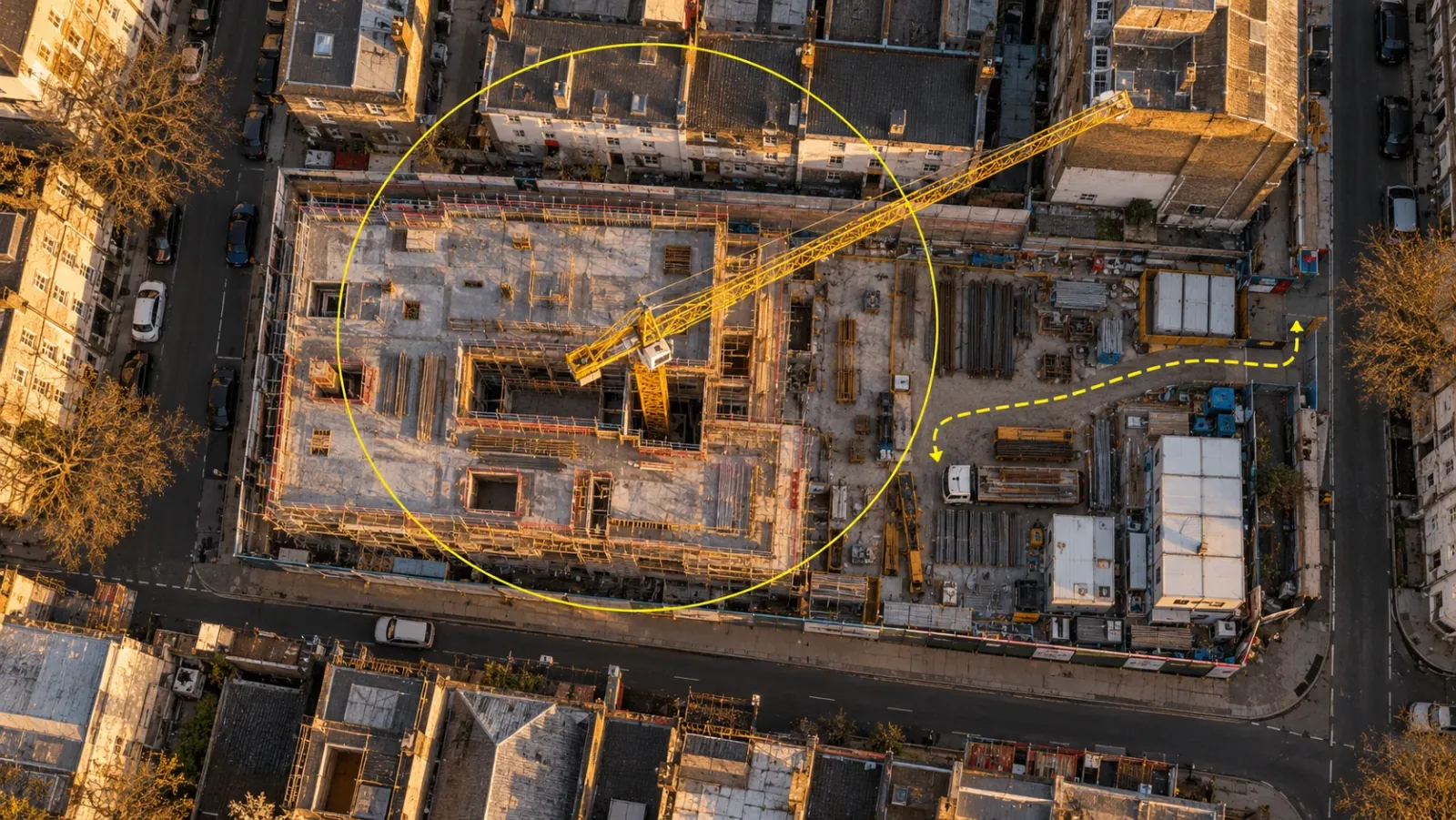
Executive Summary
- The Question: What does it take to put together a construction site logistics plan that works on day one, and how do you stop it going out of date as the site changes?
- The Answer: Build the plan from a measured image of the site, fix lifting and access first, then route traffic, allocate storage by sequence and write the delivery rules. Issue one drawing per phase, and check it against fresh aerial imagery on a set rhythm so it is redrawn when the site moves, not after something goes wrong.
- The YelloSKYE Angle: Construct IQ supplies dated aerial maps and fixed-camera views of gates and yards through the DEX platform, giving the logistics manager a current base to plan on and a record to check against.
A construction site logistics plan sets out how people, vehicles, plant and materials will get to the site, move around it and be stored there, phase by phase. It is part drawing and part rulebook: where the gates, routes, cranes and laydown areas are, and how deliveries are booked, received and unloaded.
The plan only helps while it matches the site. Most plans are drawn carefully at mobilisation, then overtaken within weeks as the structure grows and storage spreads. This guide covers how to build a plan, how to phase it and how to use current aerial maps from YelloSKYE's Construct IQ to keep it accurate. For the map itself, including how its layers are built and refreshed, see our guide to construction site mapping.
What goes into a site logistics plan
A complete plan answers the same questions at every phase. The table lists the elements and the mistake each one most often suffers from.
| Element | What the plan should show | Common mistake |
|---|---|---|
| Boundary and hoarding | Site perimeter, hoarding line, any licensed use of pavements or roads | Hoarding drawn on the title line rather than where it really stands |
| Gates and approach | Vehicle and pedestrian gates, approach roads, vehicle size limits | One gate for everything, so deliveries queue on a public road |
| Vehicle routes | Haul roads, one-way loops, turning and reversing areas | Routes that assume space later taken by the structure |
| Pedestrian routes | Segregated walkways from gate to welfare and work areas | Walkways that cross the busiest vehicle route |
| Delivery and holding areas | Unloading points, off-site holding or call-forward area | No holding area, so early arrivals wait in the street |
| Laydown and storage | Yards by trade and phase, with ground bearing limits | Storage placed on ground due to be excavated |
| Lifting | Crane positions, radius, capacity at the tip, oversail, hoists | Capacity checked at the hook but not at the furthest pick |
| Welfare and offices | Cabins, canteen, drying rooms, parking | Cabins in a spot needed for a later phase |
| Temporary services | Power, water, lighting, drainage, site communications | Cable routes crossing haul roads without protection |
| Waste | Skips, segregation, collection access | Skips placed where the collection vehicle cannot reach |
| Emergency | Fire access, hydrants, assembly points, first aid | Fire route blocked by a stored delivery |
Building the plan, step by step
1. Start from a measured, current base
Draw the plan on a georeferenced aerial map of the site as it is today, not on the architect's site plan. A drone orthomosaic shows existing kerbs, trees, slopes, neighbouring structures and the real width of the approach roads. If the plan is drawn before work starts, this is also the baseline record of the site. Our explainer on what an orthomosaic is covers why you can measure from it.
2. Mark what will not move
Add the fixed constraints first: boundaries, public roads, neighbouring buildings, protected trees, overhead lines, known buried services and any restrictions on working hours, noise or road use. Rules on using public roads, pavements and airspace over neighbours vary by country and by local authority, so confirm which permits are needed and how long they take.
3. Find the peak
Logistics plans fail at the busiest moment, not the average one. Identify from the programme:
- the heaviest single lift and where it lands;
- the day with the most deliveries, such as a large concrete pour;
- the phase with the most trades and workers on site;
- the longest vehicle that must enter, and where it turns.
Size gates, routes, welfare and storage for that peak.
4. Place lifting before anything else
Crane and hoist positions shape everything around them. Check the radius to the furthest pick and the capacity at that radius, where the base and its foundation will sit, how the crane will be erected and dismantled, and whether the jib oversails neighbouring property or a public road. Mobile crane positions need firm, level standing and room for outriggers.
5. Route the traffic
Design a route that lets vehicles enter, unload and leave without reversing where possible. Separate pedestrians physically from vehicles, and keep the approach clear of school entrances, bus stops and narrow junctions. Mark where traffic marshals stand.
6. Allocate storage by sequence
Give each laydown area a purpose, an owner and an end date. Materials that arrive weeks before they are needed need a yard that will not be built over in the meantime; materials that can be delivered to the point of use should be. Check ground bearing for heavy stacks and stored plant.
7. Add welfare, services, waste and emergency
Place cabins and services where they can stay for as many phases as possible, because moving them costs time and disrupts power and water. Keep fire access routes and assembly points clear and visible on every phase drawing.
8. Write the delivery rules
The drawing needs rules to work. A short delivery procedure should say how slots are booked, how long each slot is, which gate and unloading point to use, what vehicle sizes are allowed, who receives the delivery and what happens to vehicles that arrive outside their slot.
Phasing: one drawing per stage
A single logistics drawing for the whole project is the most common reason plans are ignored. Issue a version for each phase, with the date it takes effect.
| Phase | What changes | Main logistics pressure |
|---|---|---|
| Enabling and demolition | Hoarding goes up, services are diverted, structures removed | Waste removal, dust and noise, protecting neighbours |
| Groundworks and substructure | Excavation, piling, basement | Muck-away traffic, haul roads that move daily, wet ground |
| Frame | Crane erected, frame rises floor by floor | Concrete and steel deliveries, crane time, storage near the lift zone |
| Envelope | Facade, roof and glazing | Large panels, hoists and mast climbers, storage at height |
| Fit-out | Many trades indoors at once | Hoist capacity, small frequent deliveries, storage within the building |
| External works and handover | Cabins and cranes removed, landscaping and roads built | Access over finished surfaces, welfare relocation |
Each phase change is a moment to redraw the plan on a fresh aerial map, not to annotate the old one.
Managing deliveries
Most congestion comes from deliveries arriving at the same time, at the wrong gate, or before there is anywhere to put them.
- Book every delivery. One booking calendar, visible to every trade, with fixed slots per gate.
- Tie slots to readiness. Confirm the receiving area is clear and the crew is ready before the slot is confirmed.
- Use a holding area. An off-site call-forward area keeps early vehicles off public roads until the gate is free.
- Avoid local peaks. Keep deliveries away from school-run and rush-hour traffic where local rules or good sense require it.
- Record what happened. Note late arrivals, refused deliveries and waiting times so the slot pattern can be adjusted.
Planning the work that drives those deliveries belongs to the weekly lookahead; our guide to construction coordination explains how to run it.
Keeping the plan current with aerial maps
A logistics plan goes stale quietly. Yards creep, a temporary route becomes permanent, a skip moves into a fire lane. Nobody issues a revision because nobody decided to change anything.
Check plan against site on a fixed rhythm
Overlay the current plan on each new aerial map and look for drift:
- storage outside its marked area or on ground due for excavation;
- vehicles using routes not on the plan;
- gates, hoarding or barriers in different positions;
- crane reach no longer covering the areas that need lifts;
- blocked fire access or emergency routes.
Weekly flights suit busy phases such as groundworks and frame; fortnightly is often enough during fit-out. YelloSKYE's weekly aerial capture in the construction progress capture use case gave the team a measurable orthomosaic of the whole site every week, which freed more than 15 hours of site manager time each week that had gone on manual reports. The same maps give the logistics manager a current base each week.
Watch the busy points continuously
Gates and material yards change hourly, faster than any flight schedule. Fixed cameras at those points show queuing, blocked routes and how a yard is actually used between flights. Our fixed-camera construction monitoring work pairs fixed views of access points and yards with scheduled drone mapping, and in verified deployments the combination has meant up to 80% fewer site visits.
Redraw, date and brief
When the check shows the site has moved, redraw the plan on the new map, give it a revision number and date, and brief it at the next induction and toolbox talk. Keep the superseded versions. A dated series of logistics plans and aerial maps shows how the site was organised at any point, which helps when a delay, damage or safety incident is investigated later. A time-lapse record from fixed cameras adds the same history for access roads and site set-up.
Drone flights over urban sites often need permission. Rules on flying near people, roads and buildings come from each country's aviation authority, whether that is the FAA, the CAA, the GCAA or another regulator, so build approvals into the capture plan.
Is the plan working?
A few simple measures show whether the plan is helping or being worked around:
| Measure | What it tells you |
|---|---|
| Average wait at the gate | Whether slots and holding arrangements match real arrivals |
| Deliveries refused or rebooked | Whether receiving areas are ready when slots are confirmed |
| Materials moved twice | Whether laydown is in the right place for the sequence |
| Near misses on vehicle routes | Whether pedestrian and vehicle separation holds in practice |
| Laydown area in use against plan | Whether storage is creeping beyond its allocation |
| Age of current plan against site change | Whether revisions keep pace with the work |
Review them at the weekly site meeting alongside the newest aerial map.
Checklist for your site logistics plan
- Draw the first plan on a current, measured aerial map of the site.
- List fixed constraints and confirm permits for road, pavement and airspace use.
- Size gates, routes, welfare and storage for the peak, not the average.
- Fix crane and hoist positions before allocating other space.
- Separate pedestrians and vehicles on every phase drawing.
- Give every laydown area a purpose, owner and end date.
- Write delivery rules and run one booking calendar for all trades.
- Issue a separate, dated drawing for each phase.
- Compare the plan with fresh aerial imagery weekly during busy phases.
- Put fixed cameras on gates and yards, and keep every superseded plan.
Frequently asked questions
What is a construction site logistics plan?
A construction site logistics plan is a set of drawings and rules that shows how people, vehicles, plant and materials will reach the site, move around it and be stored at each phase of the work. It covers gates, routes, laydown, cranes and hoists, welfare, temporary services, waste and emergency access, together with the delivery rules everyone must follow.
Who prepares the site logistics plan?
The main contractor usually owns it. A planner or logistics manager drafts it during preconstruction with the project manager, the temporary works and lifting specialists and the health and safety lead. On large sites a dedicated logistics manager keeps it current; on smaller ones the site manager does.
When should a site logistics plan be updated?
Update it whenever the layout changes: a gate moves, a crane is erected or dismantled, a laydown area is built over, or the work enters a new phase. A regular check against current aerial imagery, weekly on busy sites, shows when the plan and the site have drifted apart even if nobody has reported a change.
What is the difference between a logistics plan and a traffic management plan?
The traffic management plan is one part of the logistics plan. It deals with vehicle and pedestrian routes, separation, speed limits, turning and reversing areas and the approach from public roads. The wider logistics plan also covers storage, lifting, welfare, temporary services, waste and delivery booking.
How do drones help with site logistics planning?
A drone map gives a measured, current picture of the whole site, so gates, routes, laydown areas and crane reach can be drawn on what is really there. Repeat flights show how the site has changed since the plan was last issued, and measured areas show whether a yard has room for the next delivery.