Construction Safety Monitoring: Using Site Imagery to Spot Hazards and Track Trends
By Kush Agarwal, President and CEO, YelloSKYE. Published .
Executive Summary
- The Question: How can drone, 360° and fixed-camera imagery help a construction team keep the site safer, and where does it stop being useful?
- The Answer: Imagery is good at showing physical conditions: open edges, breached barriers, cluttered routes, plant too close to people. Reviewed every week against a short list, it also shows trends that single walks miss. It cannot judge whether protection is adequate, and AI hazard flags still need a competent person to confirm them.
- The YelloSKYE Angle: Construct IQ captures the site on a fixed cadence and keeps every capture in the DEX platform by date and location, so a safety lead can review conditions remotely, pin each hazard where it was seen and check the next capture for the fix.
Construction safety monitoring means checking, on a fixed rhythm, the physical conditions on site that put people at risk, and keeping a dated record of what was found and when it was put right. Visual capture from drones, 360° cameras and fixed cameras lets a safety lead review far more of the site than one walk can cover, and compare this week with last week rather than relying on memory.
This guide is about method: which hazards show up well in imagery, which view suits each one, how to read trends across several captures, what AI detection can and cannot do, and a weekly review routine you can adopt. At YelloSKYE, this sits inside Construct IQ, our construction monitoring solution. For the injury data behind all this, see our construction safety statistics guide.
Monitoring is not the same as inspecting
A safety inspection is a competent person judging a specific thing: this scaffold, this excavation, this lifting plan. Monitoring is broader and lighter. It asks whether the conditions the inspections and method statements assumed are still in place across the whole site, today.
That difference matters because most safety failures on site are not design failures. A guardrail was removed to land a delivery and not put back. A barrier around a pit was moved to let a dumper through. A walkway filled up with pallets over three days. None of these needs an engineer to recognise. They need someone to look, regularly, at the right places.
Imagery helps with exactly that kind of looking. It does not replace the formal inspections described in our construction site inspections guide, and it should never be presented as if it does.
Four conditions that imagery shows well
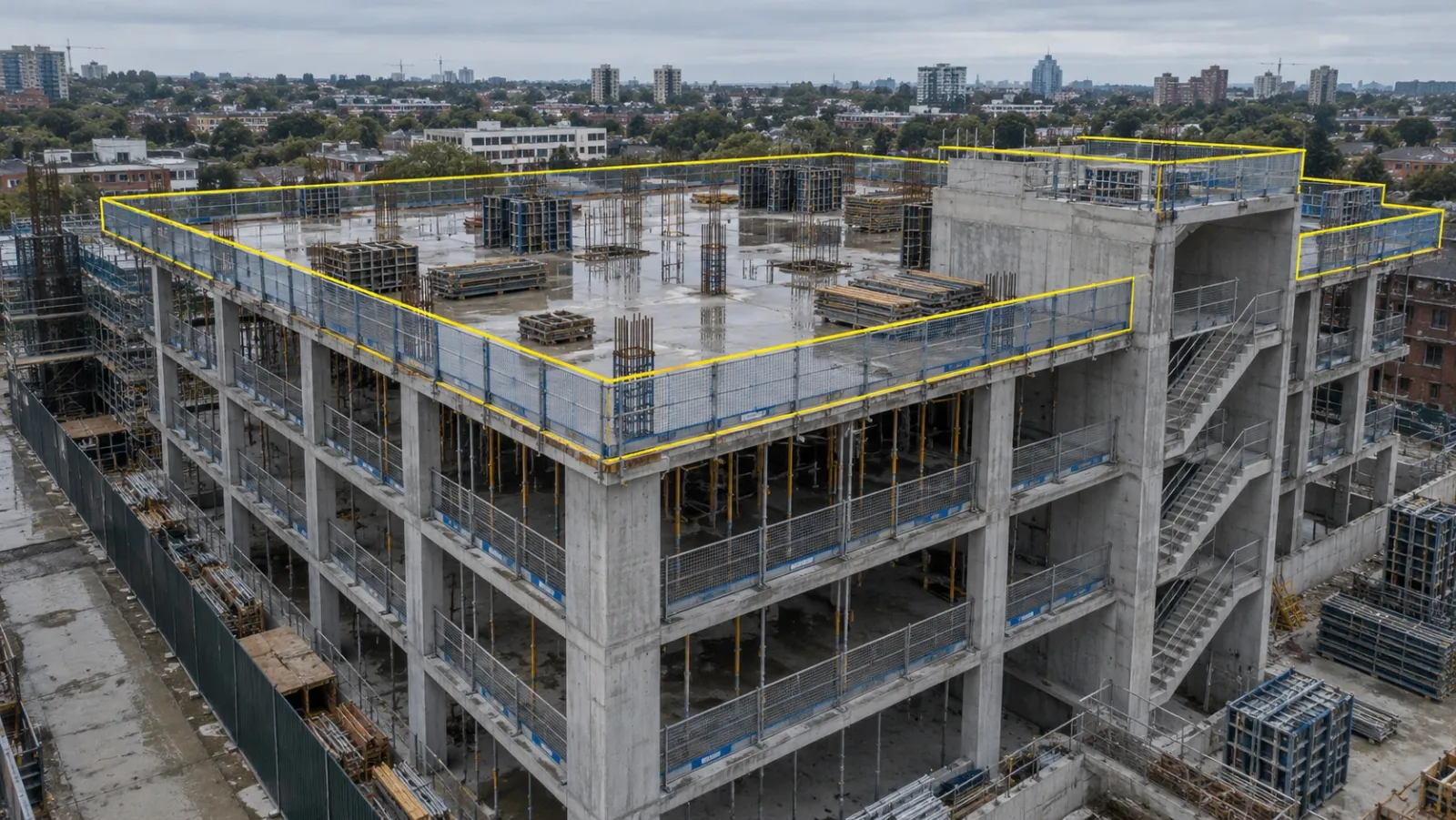
Edge protection and openings
Falls from height are the largest single cause of construction deaths in the national statistics published by bodies such as OSHA in the US and the HSE in Great Britain. On a building frame, the questions are simple and visual. Is there a guardrail or barrier along every slab edge? Are floor openings, lift shafts and stair voids covered or fenced? Has a section been taken down and left open?
A low drone pass around the frame, or a 360° walk of each floor, answers these quickly. The gap you are looking for is usually short: one missing panel next to a hoist landing or a loading bay.
Exclusion zones around plant, lifts and excavations
Exclusion zones keep people away from a crane's slewing radius, a piling rig, a deep excavation or a reversing vehicle. On paper they are clear lines. On site, the fencing gets moved, the cones drift and a shortcut appears across the corner.
From above, a top-down or oblique capture shows whether the physical barrier still matches the zone in the lift plan or the excavation plan. Over several captures it also shows whether a zone keeps getting breached at the same point, which usually means the route around it is too long.
Housekeeping and material storage
Poor housekeeping causes slips and trips, blocks escape routes and turns into a fire load. It is also one of the earliest signs that a site is under pressure. Look for waste building up on upper floors, materials stacked against edge protection, cables across walkways and storage outside the agreed laydown areas.
Interior 360° captures are best here, because most housekeeping problems sit inside the building once the frame is up.
Access routes and emergency egress
Pedestrian routes, vehicle routes and the separation between them are drawn in the site logistics plan. Emergency escape routes are drawn in the fire plan. Both change as the building grows, and both are easy to compromise without anyone noticing.
Fixed cameras at gates, hoists and the main crossing points show how routes are actually used during a shift. A drone capture shows whether the whole route network still connects, and whether a new hoarding line has cut off an escape path. Our guide to the construction site logistics plan covers how to keep that plan current.
Matching the view to the hazard
Each capture method sees some things well and others not at all. Pick the view by the question you need answered.
| Condition | Best view | What to look for | What the image cannot tell you |
|---|---|---|---|
| Slab edges and openings | Low drone pass, 360° walk per floor | Continuous barrier, covered voids, gaps at landing points | Whether the barrier meets its design load |
| Crane and lift zones | Top-down drone, fixed camera | Fencing matches the lift plan, no storage under the load path | Whether the lift plan itself is safe |
| Excavations | Oblique drone | Edge barriers, batter or support visible, spoil set back from the edge | Ground stability, water ingress below the surface |
| Housekeeping | 360° walk | Waste, stacked materials, trailing cables, blocked corridors | How long the condition has existed, unless captures are frequent |
| Vehicle and pedestrian routes | Fixed camera, top-down drone | Physical separation, crossing points, routes actually used | Driver behaviour between frames |
| Escape routes | 360° walk, drone for external routes | Routes open, signage locations clear, exits not obstructed | Whether fire doors and alarms work |
| Scaffold condition | Drone, 360° | Missing boards or rails, visible damage, tags present | Ties, loading and adequacy, which need a scaffold inspection |
The right-hand column is the important one. Write it into your monitoring procedure so that nobody treats a clean image as a pass.
Reading trends, not just single captures
A site walk gives you a snapshot. A run of dated captures gives you a pattern, and patterns are where monitoring earns its place.
Recurring hazards at the same spot
If the same section of edge protection is open in three captures out of five, the problem is not carelessness. It is probably a delivery or access arrangement that needs the barrier moved. Fix the arrangement, not just the gap.
Hazards that build slowly
Housekeeping rarely fails in one day. Comparing the same floor across several weeks shows clutter building up before it blocks anything, which gives the site manager a reason to act early.
Close-out time
Every hazard you tag has a date seen and a date closed. Tracked over a month, close-out time tells you whether the site is responding. It is a leading indicator in the sense the safety literature uses the term: it moves before injuries do.
Zones and trades
Grouping tagged hazards by zone, floor or trade shows where attention is needed. A floor with twice the open items of the others is a better use of the next site walk than a random route.
| Trend to track | How to measure it from captures | What a worsening trend suggests |
|---|---|---|
| Open hazards per capture | Count of tagged items still open at each review | Site is producing hazards faster than it fixes them |
| Average close-out time | Days from tag to verified fix | Responsibility for fixes is unclear |
| Repeat locations | Same hazard type at the same place three times or more | A layout or logistics problem, not a behaviour problem |
| Hazards by zone or trade | Share of open items in each area | Where supervision or the next walk should focus |
What AI hazard detection can and cannot do
Vendors now offer models that scan 360° and drone imagery and flag possible hazards automatically. Used well, they are a useful filter on a very large number of images. Used badly, they create a false sense of cover.
Where it helps
Models are strongest on things that look much the same on every site: a gap in a guardrail, an uncovered opening in clear view, materials stored in a marked walkway. On a big project with hundreds of 360° frames a week, a model that pulls out the frames worth looking at saves a safety lead real time.
Where it falls short
- Context. A model can see a person near an edge. It cannot tell whether that person is clipped to an anchor the camera cannot see, or working under a permit that allows it.
- Adequacy. It can see that a barrier exists, not whether it is strong enough or correctly fixed.
- What is out of frame. A hazard behind a column or outside the captured route does not exist as far as the model is concerned.
- Unusual sites. Models learn from the sites they were trained on. A first-of-a-kind structure or an unusual method gives them less to go on.
- Alert fatigue. Too many low-value flags and people stop reading them.
Questions to ask about accuracy claims
Accuracy figures in marketing are often a single percentage with no definition. Ask how many of the model's alerts were real hazards, and separately how many real hazards it missed, measured on sites similar to yours. Ask who reviews alerts before they reach the site team. Then test it on a few weeks of your own captures where you already know what was there. Our guide to AI drone inspection explains the same evaluation in more depth for asset defects.
Settle the workforce questions before switching anything on: what is captured, who sees it, how long it is kept and whether it can be used to identify individuals. Follow the data protection rules where you build.
A weekly safety review routine
The routine below fits a typical building site on a weekly capture cycle. Adjust the days to your own programme.
| Day | Activity | Owner |
|---|---|---|
| Monday | Drone flight over the site and 360° walk of active floors, on fixed routes | Capture lead or site engineer |
| Tuesday morning | Safety lead reviews the new capture against the standing checklist and tags each hazard at its location | Safety lead |
| Tuesday afternoon | Each tagged hazard gets an owner and a target date; urgent items go to the site manager by phone, not by tag alone | Safety lead, site manager |
| Wednesday to Friday | Trades fix; fixed cameras on gates, hoists and crane zones are checked daily for route and zone breaches | Trade supervisors, site manager |
| Following Monday | Next capture confirms each fix; items closed only on evidence | Safety lead |
| Monthly | Trend review: open items, close-out time, repeat locations, zones | Safety lead, project manager |
Three rules keep it working. Capture the same routes every week so that comparisons are fair. Keep the checklist short enough to finish in a morning. And never let a tag replace a conversation when someone is in immediate danger: stop the work first and record it afterwards.
Where YelloSKYE fits
Construct IQ was built for progress monitoring, and the same captures can support a safety review without a separate flight. YelloSKYE's construction monitoring page lists remote hazard identification through 360° walk-throughs among the uses for safety teams. Inside DEX, issues are tagged directly on the site visuals so the responsible trade sees exactly where the problem is, and the record can be scrolled back day by day, which is what makes trend review and incident investigation possible.
Construct IQ can also send a notification when activity stops in a zone marked as high priority. In the fixed-camera construction monitoring use case, cameras are pointed at access points and material yards, and verified deployments recorded up to 80 per cent fewer site visits, which also means less time spent by managers walking active areas just to check status. Our aerial progress capture use case describes the weekly drone flights that give the site-wide view, and the interior fit-out use case shows how 360° captures and visual issue logs work once the building is enclosed.
Captures are carried out by YelloSKYE's certified pilots or by your own site team, and civil and geospatial engineers check automated outputs before they are relied on.
Getting started: a checklist
- List your top site hazards for the current phase and map each to the capture view in the table above.
- Write the image-limits column into your procedure so that nobody signs off a condition from a picture alone.
- Fix capture routes and cadence before you start, and keep them stable.
- Name one safety reviewer per capture and give them a set checklist and a deadline.
- Tag every hazard at its location with an owner and a target date, and close it only on a later capture or a dated photo.
- Track four trend measures monthly: open items, close-out time, repeat locations and hazards by zone.
- Trial any AI detection on your own past captures before trusting it, and keep a person between the model and the site team.
- Agree camera use with the workforce before the first capture, and review it when the site changes.
Frequently asked questions
What is construction safety monitoring?
Construction safety monitoring is the regular review of site conditions that affect safety, such as edge protection, exclusion zones, housekeeping and access routes, using dated imagery as well as physical walks. The imagery lets a safety lead check more of the site more often and see whether conditions are improving or getting worse over time.
Can drones be used for construction safety?
Yes, mainly for seeing the site layout from above: excavation edges, plant movement areas, crane zones, laydown and haul routes. A drone flight cannot judge whether a scaffold or temporary works design is adequate, and flights over active work must follow the aviation rules where you build and the site's own lifting and exclusion arrangements.
How accurate is AI hazard detection on construction sites?
It depends on the hazard, the camera angle and how the accuracy was measured. Models are reasonably good at spotting things that look the same everywhere, such as a missing guardrail section or an unprotected opening in clear view, and much weaker at context. Ask any vendor how many real hazards the system missed on a site like yours, not only how many of its alerts were correct.
How often should site imagery be reviewed for safety?
A weekly structured review suits most building sites, with fixed cameras watching the highest-risk zones in between. Increase the frequency when the site changes fast, for example during frame erection, major lifts or deep excavation, and after any incident or near miss.
Does camera monitoring replace a safety officer's site walk?
No. It extends what the safety officer can see between walks and gives them a dated record to compare against, but competent people still need to inspect, talk to the crews and stop unsafe work. Monitoring is most useful when it decides where the next walk should focus.